How to convert a PDF to one long image
- Choose a PDF. Tap Choose a PDF or drop the file on the box. A preview of the pages appears.
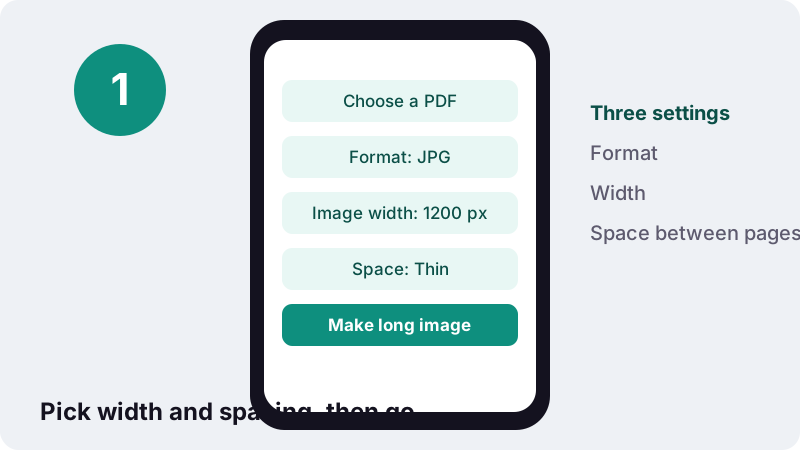
- Set format, width and spacing. Pick JPG or PNG, an image width of 800, 1200 or 1600 px, and None, Thin or Wide space between pages.
- Make long image. Press Make long image. Every page is drawn and stacked on your device.
- Download. Tap the download button to save the single tall JPG or PNG.
What is a PDF to long image converter?
A PDF to long image converter draws every page of a document and glues them together top to bottom, so the whole file becomes one tall picture. People also search for it as PDF to one image or convert PDF to single image; the result is the same: one JPG or PNG you scroll through like a web page.
On ilovepdfe this happens inside your browser. The page reads the PDF from your device, renders each page with PDF.js, paints them onto one canvas and saves that canvas as a single file. Nothing is sent to a server, and the result screen confirms 0 bytes uploaded.
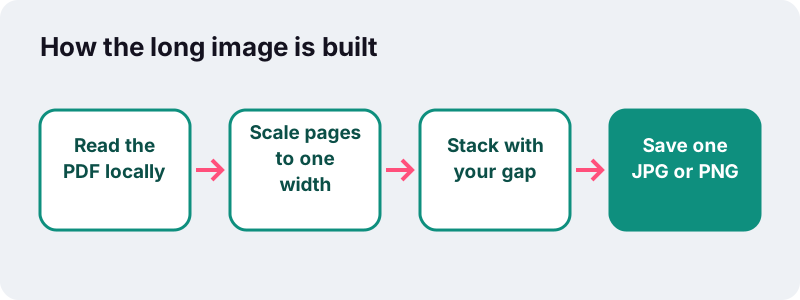
How do you turn a PDF into one long image?
Pick the PDF, choose a format, a width and the spacing, then press the button. It takes four steps, works the same on a phone or a computer, and needs no app or browser extension.
- Tap Choose a PDF or drop the file on the box. A preview of the pages appears so you can check you have the right document.
- Under Format, keep JPG for a lighter file or pick PNG for exact, lossless pixels.
- Set Image width (800, 1200 or 1600 px) and Space between pages (None, Thin or Wide).
- Press Make long image. When the progress line finishes, tap the download button to save
yourfile-long.jpgor.png.
Password-protected PDFs cannot be opened. Remove the password in your PDF reader first, then try again.
Why send a PDF as one long image?
Because a picture opens instantly where a PDF does not. In most chat apps an image shows up in the conversation itself, while a PDF arrives as an attachment that the other person has to tap, download and open in a reader.
- Chat apps: send a menu, a timetable, a receipt or a short contract as one image that previews inline.
- Social posts and stories: share an infographic, a one-pager or a slide summary as a single scrollable picture.
- Previews: show a whole brochure at a glance on a web page or in a product listing.
- Proofreading on a phone: scroll the entire document without page breaks interrupting the flow.
- Archiving a page-by-page receipt: one file is harder to lose than a folder of page images.
- Screenshots replaced: no more stitching ten phone screenshots by hand.
If the receiver needs to print, sign or search the text, keep it as a PDF instead. An image of a page is a picture of words, not words you can select.
Which image width should you choose?
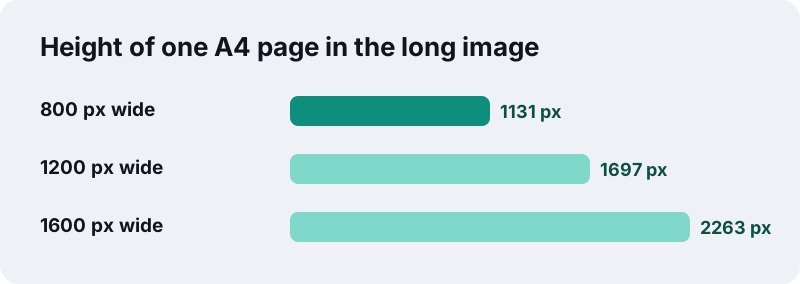
Pick 1200 px for most chats and posts, 800 px when the document is long or the file must stay small, and 1600 px when small print has to stay readable after zooming. Every page is scaled to the same width, so the height grows with the number of pages.
| Image width | Height of one A4 page | A4 pages before narrowing (thin gap) | Best for |
|---|---|---|---|
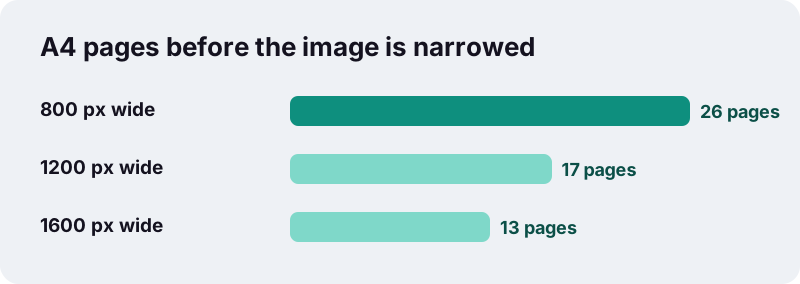
| 800 px | ≈ 1,131 px | 26 | Long documents, quick previews, slow connections |
| 1200 px (default) | ≈ 1,697 px | 17 | Chats, social posts, reading on a phone |
| 1600 px | ≈ 2,263 px | 13 | Dense text, tables, zooming in on a big screen |
A landscape page, such as a slide, is wider than it is tall, so at the same width it takes much less height. A 20-slide deck therefore fits more easily than a 20-page A4 report.
How tall can a single image from a PDF get?
Our tool keeps the final picture under about 30,000 pixels tall and under 120 million pixels in total. When your document would be taller than that, it narrows the whole image evenly instead of failing, and tells you the width it used.
These ceilings exist because the browser draws the image on a <canvas> element, and canvases have size limits that vary between browsers and devices. MDN, the reference documentation for web developers, explains it this way:
“The exact maximum size of a <canvas> element depends on the browser and environment. While in most cases the maximum dimensions exceed 10,000 x 10,000 pixels, notably iOS devices limit the canvas size to only 4,096 x 4,096 pixels.”
What does narrowing mean for a PDF to long image job?
Take a 40-page A4 report at 1200 px with thin gaps. Stacked at full width it would be about 68,000 px tall. The tool scales it down to fit 30,000 px, so the image comes out roughly 528 px wide. It still holds every page, but small text gets harder to read.
What about iPhone and iPad?
MDN notes that iOS devices allow much smaller canvases than desktop browsers. On an iPhone or iPad the tool detects this and narrows long documents further, to about 16 million pixels in total, so the image stays within what Safari can draw. Choose 800 px, cut the document shorter, or use a computer.
How do you convert a PDF to a single image that stays readable?
Keep the image short enough that it never needs narrowing. In practice that means converting only the pages that matter and matching the width to the page count.
- Remove pages nobody needs with Remove pages (cover sheets, blank backs, terms pages).
- For a big file, cut it into parts with Split PDF and make one long image per part.
- Fix sideways scans first with Rotate PDF; a landscape page scaled to the column width looks tiny.
- Under about 13 A4 pages, use 1600 px. Between 13 and 26 pages, use 800 or 1200 px.
- Choose PNG when the pages are mostly text and lines, JPG when they contain photos.
Want the pages in a different order inside the strip? Rearrange them with Organize pages before you make the long image; the tool always stacks pages in the order they sit in the PDF.
Should the long image be JPG or PNG?
Choose JPG for smaller files and photo-rich pages; choose PNG when sharp text and thin lines matter more than file size. WebP is not offered for long images, because JPG and PNG are what chat apps and social networks most reliably accept.
| JPG | PNG | |
|---|---|---|
| Compression | Lossy (saved at 0.88 quality) | Lossless |
| File size for text pages | Smaller | Larger |
| Edges of small letters | May soften slightly | Stay exact |
| Photos inside the PDF | Compact and natural | Very large files |
| Typical use | Chats, social posts | Proofs, diagrams, plans |
The background between and behind pages is white in both formats, so the strip looks like paper on any app's dark or light theme.
What does the space between pages change?
It sets the white band that separates one page from the next. None makes a seamless strip, Thin adds an 8 px divider, and Wide adds 24 px so each page reads as its own card.
| Option | Gap | When to use it |
|---|---|---|
| None | 0 px | Infographics or designs that continue across pages |
| Thin (default) | 8 px | Most documents: you still see where a page ends |
| Wide | 24 px | Slides, receipts or forms where page breaks matter |
How is PDF to long image different from PDF to JPG?
This tool gives you one file with every page; PDF to JPG gives you one image per page, at 72, 150 or 300 DPI, in JPG, PNG or WebP, for the pages you choose. Use the second when you need print resolution or a few specific pages.
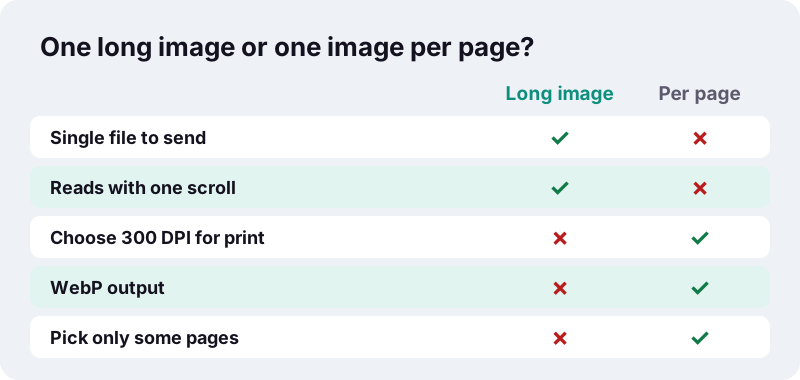
Both tools render the same way, on your device, and neither changes your original PDF. You can run both on the same file in a minute: a long image for the chat, and separate high-resolution pages for whoever needs to print.
Is your document private when you make a long image?
Yes. The file is read by your browser through the FileReader interface, which MDN describes as reading files the user has explicitly selected from their own computer. The rendering and the image encoding happen in the same tab, so there is no upload step at all.
Many online PDF services upload your document to their servers to convert it. With a long image of a bank statement, a payslip or a medical form, avoiding that step is the point: the only copy that leaves your device is the one you choose to send.
More detail is on our privacy page.
What can go wrong, and how do you fix it?
The message says the image was narrowed
The document was too tall for the canvas ceiling. Pick a smaller width, remove pages, or split the PDF into two halves and make two long images.
The chat app compressed my image
Many messengers re-compress large pictures. Sending at 800 or 1200 px usually survives better than 1600 px, and some apps let you send the picture as a file to keep it untouched.
Some pages look tiny
Those pages are probably landscape or sideways. Every page is fitted to the same width, so rotate them upright first.
The download is huge
Switch from PNG to JPG, or reduce the width. A PNG of photo-heavy pages can be many times larger than the JPG.
More free tools that run in your browser
Every ilovepdfe tool works the same way: no upload, no account, no watermark added. Combine them to prepare a document before you turn it into a single picture.
Frequently asked questions
How do I convert a PDF into one long image?
Choose your PDF on this page, pick JPG or PNG, a width (800, 1200 or 1600 px) and the space between pages, then press Make long image and download the file. All pages are stacked top to bottom in one picture.
Is this the same as converting a PDF to a single image?
Yes. PDF to one image, PDF to single image and PDF to long image all describe the same result: every page joined vertically into one JPG or PNG.
Is there a page limit?
There is no fixed page count, but the image is kept under about 30,000 px tall. Longer documents are narrowed to fit; at 1200 px wide, roughly 17 A4 pages fit before that happens.
Why is my long image narrower than the width I chose?
Browsers cap how large a canvas can be. When your pages would exceed the tool's ceiling, it scales the whole image down evenly and tells you the width it used.
Does it work on iPhone?
It works in Safari and other iOS browsers, but MDN notes iOS devices limit canvas size to 4,096 × 4,096 pixels. Long documents may fail there; use 800 px, fewer pages, or a computer.
Can I choose which pages go into the long image?
Not in this tool; it uses every page in order. Remove or reorder pages first with the Remove pages or Organize pages tools, then make the long image.
Are my files uploaded?
No. The PDF is read and drawn inside your browser, and the image is saved directly to your device. The result shows 0 bytes uploaded.
Can I get WebP instead of JPG?
The long image tool offers JPG and PNG. If you need WebP, use PDF to JPG, which saves one WebP image per page.
Will the text in the image be searchable?
No. The result is a picture of the pages. There is no OCR, so the words cannot be selected or searched.
Is ilovepdfe the same as iLovePDF?
No. ilovepdfe is an independent site and is not affiliated with iLovePDF, which is a separate company. The practical difference is that ilovepdfe processes your files in your browser instead of uploading them.
Sources
- <canvas>: The Graphics Canvas element (Maximum canvas size) — MDN Web Docs
- HTMLCanvasElement: toBlob() method — MDN Web Docs
- Image file type and format guide — MDN Web Docs
- FileReader — MDN Web Docs
- Paper size — Wikipedia
- PNG — Wikipedia
- PDF (Portable Document Format) Family — Library of Congress