How to compress PDF files to 200 KB each
- Choose PDF files. Tap Choose PDF files and select every document of your application packet at once.
- Confirm the 200 KB target. Exact size is selected and the maximum size reads 200 KB. Change it to your own share of the total, such as 190 or 240.
- Press Compress PDF. Press Compress PDF. Files are handled one after another, each re-drawn only as far as needed to fit.
- Download and total the sizes. Download each -compressed.pdf file, add up the sizes, and make sure the packet stays inside the portal's combined limit.
When is 200 KB the right size per file?
When a portal gives you one total allowance for a whole set of documents. Divide that total by the number of files and you often land near 200 KB each, which is enough for a clean multi-page scan.
A real example: the applicant portal instructions published by the Embassy of India in Tallinn allow up to five documents per application, photograph and signature included, all in PDF, and cap their combined size.
“The total of all uploaded documents should be not more than 1 MB”
Five files sharing 1 MB works out at about 200 KB each. The Brussels mission's version of the same guide states the same 1 MB total. Rules change, so check the current instructions on your own portal.
How do you divide a shared limit between documents?
Give the biggest share to the document with the most pages, and keep small items like a signature tiny. A simple division is the starting point:
| Total allowed | Number of files | Even share per file | Suggested target to type |
|---|---|---|---|
| 1 MB | 5 | about 205 KB | 190–200 |
| 1 MB | 4 | 256 KB | 240 |
| 1 MB | 3 | about 341 KB | 320 |
| 2 MB | 10 | about 205 KB | 190–200 |
| 2 MB | 8 | 256 KB | 240 |
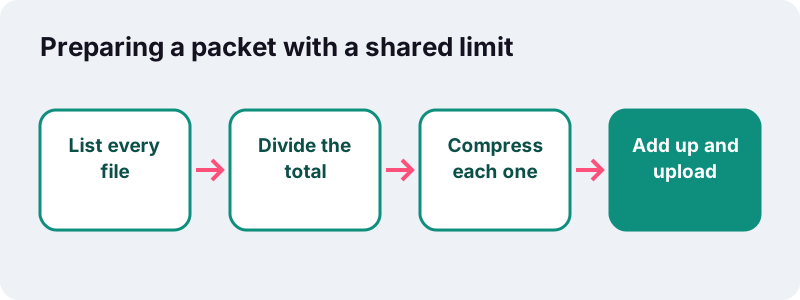
Uneven packets are normal. A one-page photo might need only 40 KB, freeing space for a six-page bank statement that gets 300 KB instead of 200.
What happens when you compress PDF to 200KB here?
The engine first re-saves the file losslessly. If that copy is already under 200 KB, you get it back with its text intact. Only if it is still too big are pages re-drawn as JPEG images, stepping down quality until the file fits.
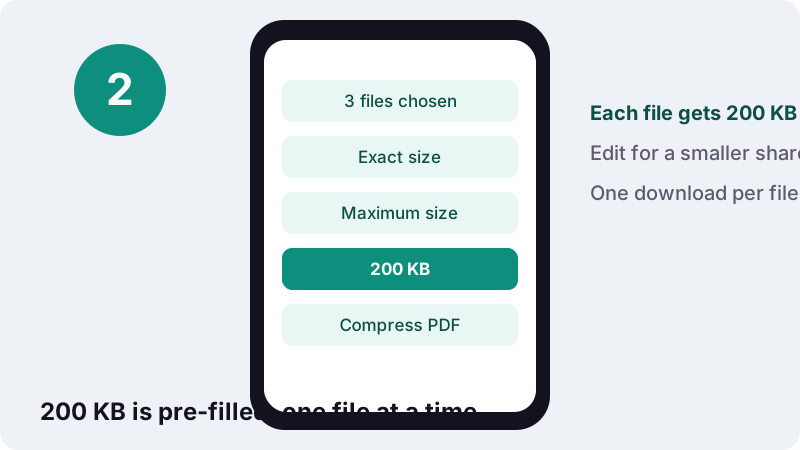
You can select every document of the packet at once. Each one is compressed to the same limit and comes back as its own file, named after the original with -compressed added.
Want different targets for different files? Run them in separate passes and change the number between runs.
What our 200 KB tests produced
In our tests every sample landed below the limit, with room to spare. These are measured numbers, not promises; your scans and device will give different figures.
| Sample document | Starting size | Result at 200 KB | Spare room | Seconds |
|---|---|---|---|---|
| Typed 6-page PDF, exported digitally | 5 KB | 4 KB | 196 KB | 0.1 |
| Scanned 5-page contract at 200 DPI | 2,522 KB | 148 KB | 52 KB | 13.1 |
| Four full-colour photo pages | 8,265 KB | 150 KB | 50 KB | 42.7 |
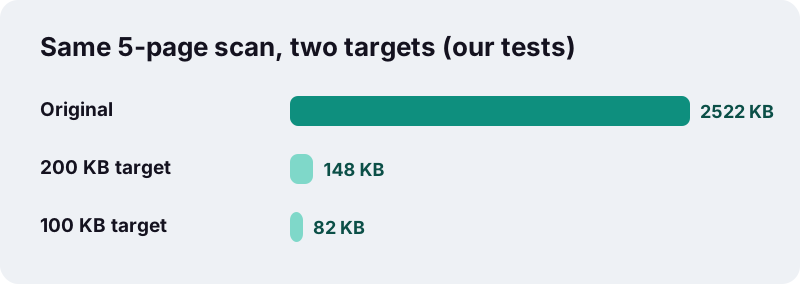
Compare the scanned contract: 148 KB at this target versus 82 KB at the 100 KB preset. Nearly twice the bytes per page means sharper stamps, cleaner signatures and fewer blocky edges.
How many scanned pages fit in 200 KB?
Roughly ten. At 15 to 20 KB per page a scan stays readable, so 200 KB comfortably carries a ten-page grayscale scan and can stretch further for clean typed scans.
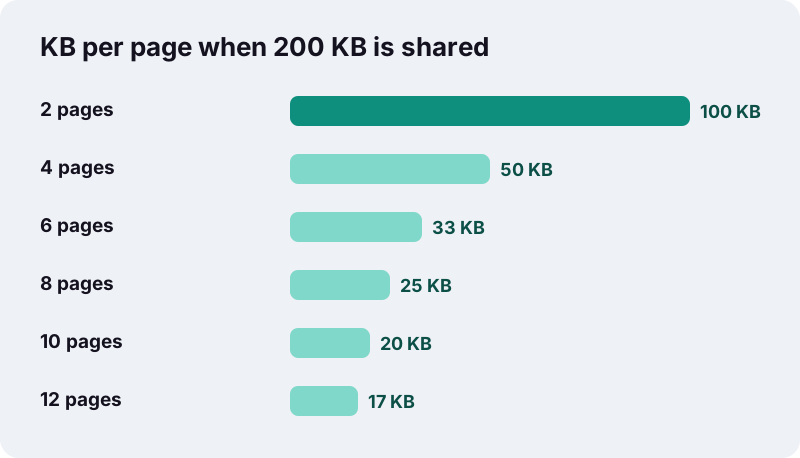
| Document example | Pages | Bytes per page at 200 KB | Expected look |
|---|---|---|---|
| Passport bio page and back cover | 2 | 100 KB | Near original |
| Degree certificate plus transcript | 4 | 50 KB | Sharp |
| Three months of printed bank statements | 6 | about 33 KB | Clear |
| Rental or employment contract | 8 | 25 KB | Clear for body text |
| Full transcript with grading key | 12 | about 17 KB | Readable, fine print soft |
Should you merge first or compress first?
Compress first, then merge, if the portal wants one combined file. Merging on ilovepdfe copies pages without re-encoding them, so the merged size is close to the sum of the parts.
- Compress each source PDF to its share of the limit.
- Join them in the right order with Merge PDF.
- Check the total; if it creeps over, compress the merged file once more with a slightly lower target.
Going the other way, merging a huge packet and compressing it in one go, works too, but every page then shares one budget and you lose control over which document stays sharpest.
Why does a 199 KB file get rejected?
Because kilobytes are not counted the same way everywhere. This tool uses 1 KB = 1,024 bytes, while some systems use 1,000, so a file can be just under the limit here and just over it there.
“The IEC further specified that the kilobyte should only be used to refer to 1000 bytes.”
A 200 KB limit counted in thousands is 200,000 bytes, about 195 KB in our units. Typing 190 or 195 as the target covers both readings.
Can you compress PDF to 200KB and keep the text searchable?
Yes, when the document was created digitally. E-statements, online certificates and letters exported from a word processor are usually far below 200 KB already, and the tool hands back the lossless copy with text intact.
- Download statements and certificates as PDF from the issuer's website instead of printing and scanning them.
- Scanned or photographed pages are pictures from the start; re-drawing them does not remove any real text.
- Keep the uncompressed originals; once a page is re-drawn the lost detail cannot be restored.
Built-in tools face the same trade-off. Apple's Preview, for example, includes this caution in its help page:
“Note: When compressed, the PDF may be of lower quality than the original.”
Are identity documents safe to process here?
They never leave your device. Visa and consular packets contain passport numbers, addresses and finances, and on this page the browser opens them locally and builds the smaller copy inside the tab.
MDN's File API documentation explains that web applications can access files when the user makes them available through a file picker or drag and drop. That local access is all this tool uses; there is no upload step, and the result screen confirms 0 bytes uploaded.
Other sizes and companion tools
Your share might be bigger or smaller than 200 KB. Try 500 KB for long scans, or the main Compress PDF tool for levels without a limit. For photos of documents, JPG to PDF under 200 KB builds the PDF at size.
Frequently asked questions
Why compress PDF to 200KB instead of 100 KB?
If your share of the limit allows it, 200 KB keeps roughly twice the detail per page. In our tests the same scan came out at 148 KB here and 82 KB at a 100 KB target.
Can I give each file a different target?
Yes, by running separate passes. Choose the files that need 200 KB, compress them, then change the number and run the others.
My packet allows 1 MB for five files. What should I type?
About 190 to 200 KB per file. If one document is a small photo or signature, compress it lower and give the spare space to the longest document.
Does merging after compressing add size?
Very little. Merge PDF copies pages as they are, so the merged file is close to the sum of the compressed parts.
How long does a 200 KB target take?
In our tests about 13 seconds for a five-page scan and 43 seconds for four heavy colour photo pages on a desktop. Phones usually need longer.
Will my digitally issued certificate lose its text?
Usually not. Born-digital PDFs are normally far below 200 KB after the lossless re-save, so they are returned without re-drawing and the text stays selectable.
What if a document will not go below 200 KB?
You get the smallest version made and a message. Remove pages the portal does not need, rescan in grayscale, or split the file if the form has more slots.
Is there a limit on how many files I can add?
No fixed limit. Very large batches depend on your device's memory, so for big scans it can help to work in groups.
Is ilovepdfe the same as iLovePDF?
No. ilovepdfe is an independent site, not affiliated with iLovePDF, which is a separate company. The practical difference is that ilovepdfe processes files in your browser instead of uploading them.
Sources
- SOP for document uploading in Applicant Portal — Embassy of India, Tallinn
- SOP for Applicant Portal — Embassy of India, Brussels
- Kilobyte — Wikipedia
- Reduce the size of a PDF in Preview on Mac — Apple Support
- File API — MDN Web Docs
- PDF (Portable Document Format) Family — Library of Congress
- JPEG — Wikipedia