What is ilovepdfe?
ilovepdfe is a free set of PDF tools for everyday jobs: merging, splitting, reordering and removing pages, compressing to an exact size, converting between PDF and images, rotating, numbering pages and adding a text watermark. Everything happens on your phone or computer.
The site is built for people who need a quick result with a sensitive document, such as an ID scan for an application, and do not want to create an account or send the file to a stranger. The full list is on the home page.
Who runs it?
A small independent team writes the code and the guides. We are not part of a larger software company and we do not sell the documents, data or attention of the people who use the site. There are no ads at the moment.
ilovepdfe is not affiliated with, endorsed by or connected to iLovePDF S.L. or any other PDF service. The name is our own, always written in lowercase with the final e.
How do the tools work?
When you choose a file, your browser reads it from your device through the standard File API. JavaScript code from this site then edits the pages in memory and hands you the result as a download. There is no server step.
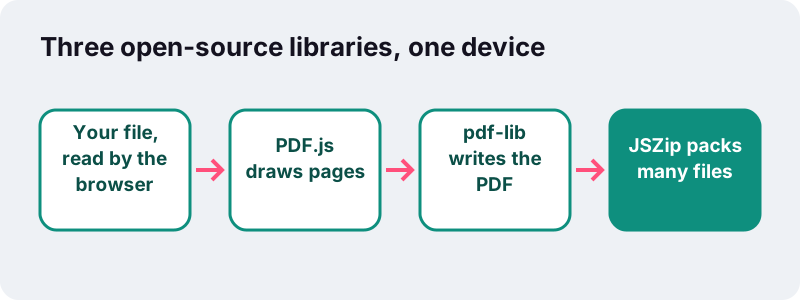
Three well-known open-source libraries do the heavy work, loaded from our own server when a tool needs them:
- pdf-lib creates and modifies PDF files: copying pages between documents, rotating them, removing them, and drawing page numbers or watermark text.
- PDF.js, a project led by Mozilla, reads PDF pages and draws them on a canvas, which is how we make thumbnails, images and compressed pages.
- JSZip bundles several output files into one ZIP when a job produces more than one file, for example splitting every page.
“PDF.js is a JavaScript library that renders Portable Document Format (PDF) files using the web standards-compliant HTML5 Canvas.”
What does “never uploaded” mean in practice?
It means the bytes of your document stay on your device from start to finish. After each job the page shows a receipt such as “Done in 1.9 s on your device · 2,522 KB read · 0 bytes uploaded”.
- We cannot see, store or recover your files, because we never receive them.
- Closing the tab clears the work from memory.
- You can check this yourself: open your browser’s developer tools, watch the Network tab during a job, and you will see the page fetch its own code but send no document.
The privacy page describes what the website itself records, and the terms cover how the tools may be used.
What are the limits?
Because your device does the work, speed and maximum file size depend on its memory and processor. In our tests on a normal Windows PC, a 5-page scan of 2,522 KB compressed to 1 MB in 1.9 seconds, while four full-colour photo pages squeezed to 100 KB took about 50 seconds.
Some features are not available yet: password protection or unlocking, signing, editing text, OCR, and conversion to or from Word, Excel or PowerPoint. Our guide to choosing an online PDF tool explains when a different kind of tool is the better choice.
How can you contact us?
Found a bug, a wrong fact or a file that will not process? Tell us through the contact page. Please describe the problem rather than attaching a private document, since we never need your file to investigate. Corrections to our guides are welcome too.
Sources
- File API — MDN Web Docs
- PDF.js — Wikipedia
- PDF — Wikipedia
- ZIP (file format) — Wikipedia