How to compress a PDF to 100 KB
- Choose PDF files. Tap Choose PDF files and select the document the form is asking for.
- Keep or adjust the 100 KB limit. Exact size is already selected with 100 KB as the maximum. Lower it slightly, for example to 95, if the portal is strict.
- Press Compress PDF. Press Compress PDF. Scans may take several seconds, photo-heavy files up to about a minute.
- Download and check. Download the -compressed.pdf file, open it, and confirm the size is under 100 KB and that every page is readable.
Why do so many application forms stop at 100 KB?
Many job, exam and admission portals cap each uploaded document at 100 KB so that thousands of applications fit on their servers and load quickly for reviewers. The cap is per file and the upload button simply refuses anything larger.
The documents people struggle with are predictable: a scanned mark sheet, a caste or income certificate, an experience letter, an ID card copy or a signed declaration. Most were scanned or photographed, so they start at one to several megabytes.
Limits vary by portal and even by field on the same form, so always read the instructions printed next to the upload box before you start.
Can your document realistically fit in 100 KB?
Usually yes, if it has five pages or fewer. A typed PDF almost always fits untouched; a scan of up to about five pages fits with some softening; long colour photo documents are where 100 KB becomes tight.
| Your file | Chance of fitting 100 KB | What it will look like |
|---|---|---|
| PDF exported from Word or Docs, any length under 20 pages | Very high, often already below | Identical; text stays selectable |
| 1–2 page scan or phone photo | Very high | Clear, slightly softer edges |
| 3–5 page black-and-white scan | High | Readable; small print may blur |
| 3–5 page colour scan with stamps or photos | Medium | Readable text, muddy pictures |
| 6+ scanned pages | Low | Consider splitting or removing pages |
If your form allows more room, our 200 KB page keeps noticeably more detail on each scanned page.
How many KB does each page get?
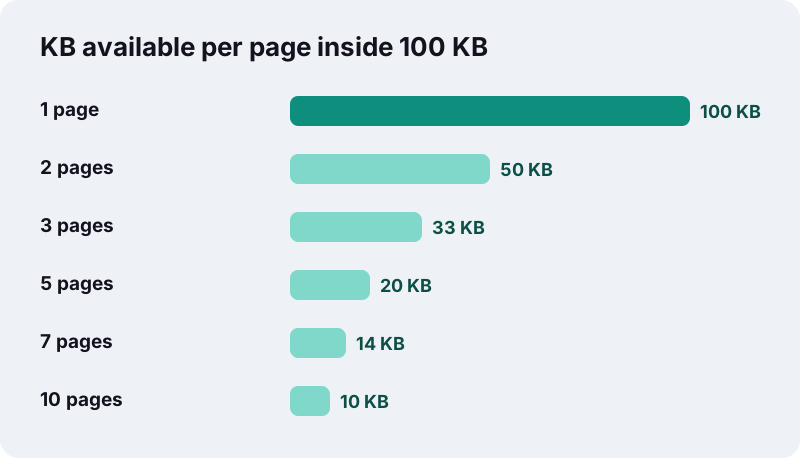
Divide 100 by the number of pages. Each page of a scan needs roughly 15 to 20 KB to stay comfortably readable, which is why five pages is the practical ceiling for scanned paperwork at this size.
| Pages | KB per page | Readability for a scanned page |
|---|---|---|
| 1 | 100 | Excellent, close to the original |
| 2 | 50 | Very good |
| 3 | 33 | Good |
| 4 | 25 | Good for normal text |
| 5 | 20 | Fine for normal text, fine print gets soft |
| 6 | about 17 | Borderline; stamps and signatures blur |
| 8 | 12.5 | Poor for scans; fine for typed PDFs |
| 10 | 10 | Scans hard to read; split instead |
What did our 100 KB tests actually produce?
All three test files ended up below 100 KB. The typed document did not even need re-drawing; the scan and the photo pages did, and the photo pages took close to a minute.
| Test file | Before | After | Under 100 KB? | Time taken |
|---|---|---|---|---|
| 6-page text PDF, born digital | 5 KB | 4 KB | Yes, text kept | 0.1 s |
| 5-page scanned contract, 200 DPI | 2,522 KB | 82 KB | Yes, pages re-drawn | 15.2 s |
| 4 full-colour photo pages | 8,265 KB | 91 KB | Yes, pages re-drawn | 50.4 s |
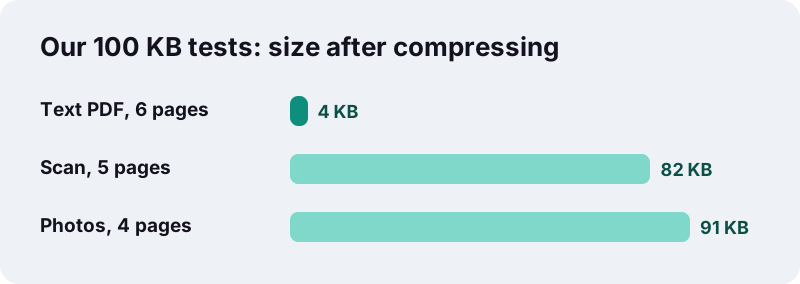
The scanned contract is the closest match to a real application document. At 82 KB it left an 18 KB margin, which is useful if a portal counts kilobytes slightly differently from us.
How do you compress PDF to 100KB on this page?
Open your file, leave the preset at 100 and press the button. The tool tries the gentle lossless method first, then walks down ten quality steps only until the file is small enough.
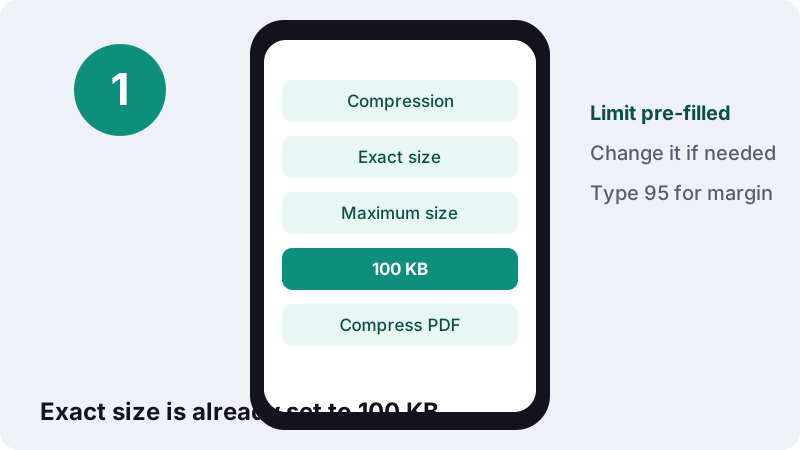
- The number is editable. If the form says 100 KB and rejects a 99 KB file, try 95.
- Several files can be done in one batch, each with the same limit.
- When the limit cannot be reached, you get the smallest version made and a message suggesting fewer pages or a split.
Will the reviewer still be able to read it?
In most cases yes, but a scan squeezed into 100 KB becomes a set of lower-resolution pictures. Print sized 10–12 pt stays legible; tiny footnotes, faint stamps and pale signatures are the first things to go.
“Higher degrees of approximation create coarser images as more details are removed.”
Because pages are re-drawn as JPEG images, the text in the result is no longer selectable or searchable. Portals that only display the document to a human do not care, but keep your original for anything else.
Could not compress PDF to 100KB? Try this
Reduce what goes in rather than crushing it harder. Fewer pages, less colour and smaller parts each give the engine more room per page.
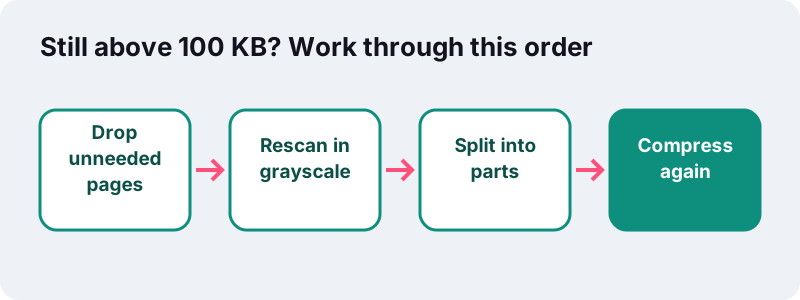
Remove pages the form did not ask for
Blank reverse sides, cover letters and instruction pages eat budget. Delete them with Remove pages from PDF, then come back and compress.
Rescan in grayscale instead of colour
A colour scan stores three channels per pixel; a grayscale scan stores one. Unless the form asks for colour, set your scanner or scanning app to grayscale at about 150–200 DPI.
“today grayscale images intended for visual display are commonly stored with 8 bits per sampled pixel.”
Split the document into separate uploads
If the portal offers several upload slots, cut the file with Split PDF and compress each part. Two files of 100 KB each carry twice the detail of one.
Starting from photos instead of a PDF?
Build the PDF at the right size directly. JPG to PDF under 100 KB shrinks the pictures while creating the file, which avoids compressing twice.
In our tests that tool turned three 12-megapixel phone photos (11,062 KB) into a 54 KB PDF with a 100 KB target, in about 3.4 seconds.
A quick check before you upload
Open the downloaded file and look at it as the reviewer will. Thirty seconds of checking saves a rejected application.
- Confirm the size in your file manager: it should read below the limit.
- Zoom to 100% and read your name, roll or registration number and dates.
- Check that signatures and official stamps are still visible.
- Make sure the page order is right; fix it with Organize PDF if not.
- Rename the file if the portal asks for a specific name format.
Does the document leave your device?
No. Application documents often carry ID numbers, addresses and dates of birth, and here they are read by the browser and processed in the tab without being sent anywhere.
Browsers provide a FileReader interface that reads files stored on your own computer, which is what this page relies on. The result screen ends with 0 bytes uploaded.
Related size limits and tools
Different form, different number? Every size page uses the same engine with its own preset, and the main Compress PDF tool lets you pick any limit.
Frequently asked questions
How long does it take to get a scan under 100 KB?
In our tests a five-page scanned contract took about 15 seconds and four colour photo pages about 50 seconds on a desktop. Phones are usually slower.
My PDF is 4 MB. Can it really reach 100 KB?
If it is a scan of up to around five pages, very likely. Our 8 MB four-page photo test ended at 91 KB. Beyond five scanned pages, remove pages or split the file.
The portal rejects my 98 KB file. Why?
Some systems count 1 KB as 1,000 bytes, while this tool uses 1,024, and some add a small overhead. Set the target to 90 or 95 and compress again.
Can I compress PDF to 100KB without losing text?
Only if the file already fits after the lossless re-save, which is common for typed documents. Scans have no real text to lose; they are images either way.
Should I scan in colour or grayscale for a 100 KB form?
Grayscale, unless colour is required. It stores one channel per pixel instead of three, so pages keep more sharpness inside the same 100 KB.
What resolution should I scan at?
Around 150–200 DPI is enough for typed documents headed to a 100 KB limit. Scanning at 600 DPI only adds detail that will be thrown away.
Can I do several documents at once?
Yes. Choose all your PDFs together; each gets its own file, compressed to the same limit.
Does it work on my phone?
Yes, in any current mobile browser. Keep the tab open while it works, since a phone may pause background tabs.
Is ilovepdfe the same as iLovePDF?
No. ilovepdfe is an independent site, not affiliated with iLovePDF, which is a separate company. The practical difference is that ilovepdfe processes files in your browser instead of uploading them.
Sources
- FileReader — MDN Web Docs
- Lossy compression — Wikipedia
- Grayscale — Wikipedia
- JPEG — Wikipedia
- Dots per inch — Wikipedia
- Image scanner — Wikipedia
- Kilobyte — Wikipedia