How to make a JPG to PDF under 100KB
- Choose images. Select the front and back, or each page, of your document.
- Order and limit. Arrange the pages with the arrows and keep Maximum size at 100 KB or type your own.
- Convert to PDF. Press Convert to PDF and wait for the message that the file fits.
- Download and check. Download the PDF, open it at 100% zoom, then upload it.
How do you convert a JPG to PDF under 100KB?
Add the picture or pictures, check that Maximum size says 100 KB, and press Convert to PDF. The converter keeps redrawing the images a little smaller until the whole document is within the limit. A JPG to PDF under 100KB with two phone photos took about two seconds in our tests.
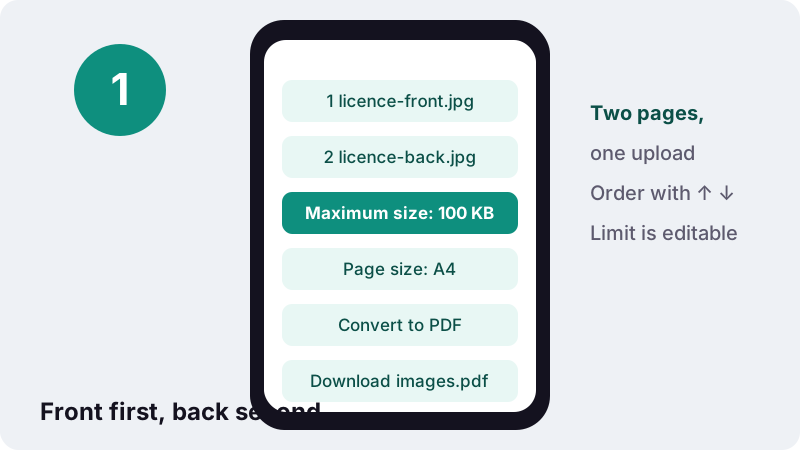
- Choose images. For an ID, add the front first and the back second; the list order becomes the page order.
- Fix the order with ↑ and ↓ if the gallery shuffled them.
- Keep the preset 100 KB, or type the number from your form.
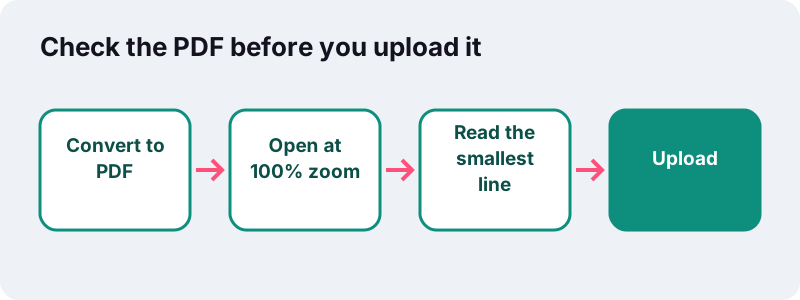
- Convert, open the result once to check it, then upload.
What is a 100 KB limit usually meant for?
It is sized for one or two pages of a document that a person needs to read, not just glance at. Forms use it for proofs that carry numbers, dates and stamps, where 50 KB would blur the details.
- Front and back of a driving licence, residence card or national ID.
- A two-page degree certificate or transcript extract.
- A signed declaration or consent form.
- A single page of an offer letter, bank letter or employer reference.
- A recent pay slip or fee receipt.
Because the exact rules differ by portal and change over time, we do not list specific sites. The number printed beside the upload button is the one that counts.
Read the whole instruction line, too. Forms often pair the size cap with other rules, such as PDF only, a single file, colour scans, or a minimum resolution. A file that meets the 100 KB rule but breaks one of the others can still bounce back weeks later, when the application is reviewed.
How big were our 100 KB results?
All three test jobs fitted, with room to spare. We used full-resolution 12-megapixel phone photos and the same engine that runs on this page, in headless Chrome on a regular Windows PC.
| Pictures | Before | After (target 100 KB) | Share of the limit used | Time |
|---|---|---|---|---|
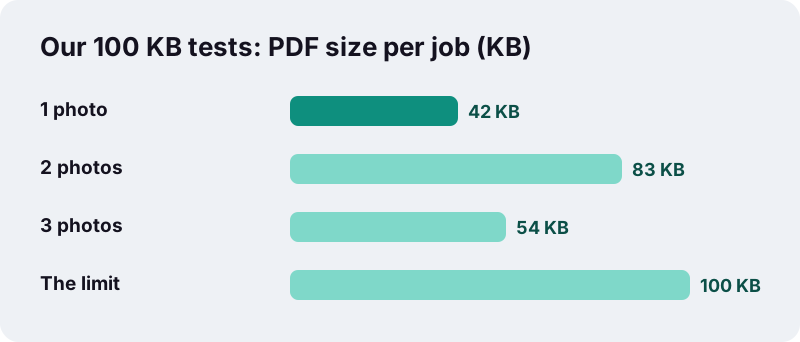
| 1 phone photo | 3,687 KB | 42 KB | 42% | 1.4 s |
| 2 phone photos | 7,375 KB | 83 KB | 83% | 2.1 s |
| 3 phone photos | 11,062 KB | 54 KB | 54% | 3.4 s |
Why did three photos come out smaller than two?
The converter stops at the first setting that fits. Two photos fitted at a gentler step, landing at 83 KB. Three photos did not fit at that step, so the engine went one notch further for every page, and the total dropped to 54 KB. Smaller is not always sharper.
How does the quality setting change the file?
Each step lowers two things at once: the picture's pixel dimensions and its JPEG quality number. The browser's canvas does the JPEG encoding, and the quality value it accepts runs from 0 to 1.
“A Number between 0 and 1 indicating the image quality to be used when creating images using file formats that support lossy compression (such as image/jpeg or image/webp).”
Our ladder starts at 0.8 with a 2,400-pixel longest side and ends at 0.22 with 480 pixels. For a 100 KB target with one or two pages, the converter normally stops well before the bottom, which keeps printed text crisp enough to read.
Only the size pages walk this ladder. On the main JPG to PDF page with quality set to Original, your photos are copied into the PDF without any re-encoding.
Is 100 KB the same as 100 kB on the form?
Almost, but not exactly. This tool counts 1 KB as 1,024 bytes, so 100 KB here is 102,400 bytes. Some portals count 1 kB as 1,000 bytes, which makes their limit 2.4% smaller.
| Way of counting | 100 KB equals | What to type to be safe |
|---|---|---|
| 1 KB = 1,024 bytes (this tool) | 102,400 bytes | 100 |
| 1 kB = 1,000 bytes (some portals) | 100,000 bytes | 97 |
| Form says “below 100 KB” | Strictly less than the limit | 95 for extra margin |
If an upload that “fits” gets rejected by a whisker, type a slightly lower number and convert again. It costs a second and avoids guessing how the portal rounds.
Should the front and back go in one PDF or two?
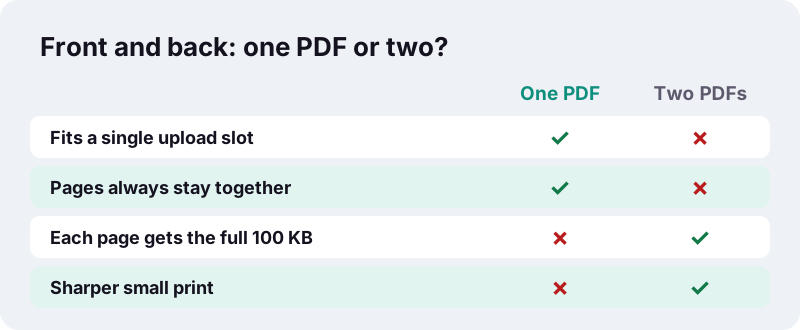
Follow the form. If it offers one slot for “ID proof”, put both sides in one PDF so the officer sees the whole card. If it offers two slots, or accepts several files, separate PDFs give each side the full 100 KB.
To join two PDFs you made separately, use Merge PDF; to pull one page out of a longer scan, use Split PDF.
How can you tell the PDF is readable enough?
Open it and read the smallest line that matters, usually a document number or a date, at 100% zoom. If you can read it without squinting, a reviewer can too.
| Check | Why it matters |
|---|---|
| Document number readable at 100% zoom | Reviewers match it against what you typed in the form |
| All four corners of the card visible | Reviewers usually need to see the whole card |
| Page order: front, then back | Reviewers expect the front first |
| No glare over the photo or hologram | Glare hides the face and security features |
| File size shown below the limit | The portal checks bytes, not looks |
If the text is soft, retake the photo closer to the document rather than raising the limit. A sharper start beats a bigger file, and it takes less than a minute to reshoot and convert again.
What if your document has three or more pages?
It can still fit; our three-photo test landed at 54 KB. But every extra page shrinks the share each one receives. For longer documents, a 200 KB allowance or separate uploads give better results.
- Allowed more space? Use JPG to PDF under 200 KB, built for multi-photo documents.
- Stricter cap? Under 50 KB is tuned for single ID cards.
- Already a PDF and too heavy? Compress PDF to 100 KB works on existing files.
If the tool cannot reach the limit, it says so and still offers its smallest attempt, so you can decide whether to drop a page.
Do you have the document as a file already?
Check before you photograph anything. Many certificates, pay slips and letters arrive as downloads or email attachments. A digital original is sharper than any photo of a printout, and often far smaller.
When a JPG to PDF under 100KB is the wrong route
- The document came as a PDF: compress that file directly instead of photographing the screen or a printout.
- It came as a picture, such as a PNG screenshot from an app: convert that picture, not a photo of your monitor.
- You only have paper: then a careful phone photo, converted here, is the right path.
A born-digital PDF with text and no photos is usually tiny to begin with. In our tests a six-page text PDF weighed just 5 KB, so it passed every limit without any compression. Compress PDF to 100 KB handles the cases where a downloaded PDF is still too heavy.
| What you have | Best tool | Why |
|---|---|---|
| Paper document | This page | Photo in, readable PDF under the limit out |
| PDF download that is too big | Compress PDF to 100 KB | Keeps the original layout; no photo step |
| Screenshot or app image | This page | Converts the picture you already have |
| Several separate PDFs | Merge PDF, then compress | One file, one upload |
Are your documents safe during conversion?
Yes, they never leave your device. The browser reads the images you choose, draws them on an in-memory canvas, and builds the PDF with JavaScript. When it finishes, the status line reads “0 bytes uploaded”.
That model is described in MDN’s FileReader reference: a web page reads files stored on your computer only after you select them. Pay slips and IDs stay where they are.
More size targets and tools
Without a size rule, the JPG to PDF converter keeps your photos at full quality. The tools below cover everything else you may need before you submit.
Frequently asked questions
How many photos fit in a 100 KB PDF?
In our tests, one, two and three full phone photos all fitted (42, 83 and 54 KB). Readability, not the limit, is what usually caps it at two or three pages.
Why is my 100 KB PDF only 42 KB?
The converter stops at the first setting that fits, and the steps are coarse. A single photo can jump from too big to well under the limit in one step.
Can I set 95 KB or 150 KB instead?
Yes. The Maximum size box is editable. Type any value and convert again.
Does 100 KB mean 100,000 bytes?
Here it means 102,400 bytes (1 KB = 1,024 bytes). If a portal counts 1,000 bytes per kB, type 97 to be safe.
Will the PDF print properly?
One or two pages at 100 KB usually stay legible on A4 or Letter if the source photos were sharp. Fine print and photos lose some detail compared with the originals.
Can I mix PNG and JPG files?
Yes. JPG, PNG, WebP, GIF and BMP can go in the same PDF. For the size target every picture is redrawn as a JPEG.
Are my files uploaded?
No. Conversion happens in your browser and the result is saved directly to your device. Nothing is sent to a server.
Is ilovepdfe the same as iLovePDF?
No. ilovepdfe is an independent site and is not affiliated with iLovePDF, which is a separate company. The practical difference is that ilovepdfe processes your files in your browser instead of uploading them.
What if it says it could not reach 100 KB?
Remove a page, crop the photos closer to the document, or split the upload. The tool still offers its smallest version so you can judge it.
Sources
- HTMLCanvasElement: toBlob() method — MDN Web Docs
- FileReader – Web APIs — MDN Web Docs
- File API — MDN Web Docs
- Image file type and format guide — MDN Web Docs
- JPEG — Wikipedia
- JPEG Image Encoding Family — Library of Congress