How to compress a PDF to 500 KB
- Choose PDF files. Tap Choose PDF files or drop them on the box. Several files can be added for a multi-attachment form.
- Check the 500 KB target. Exact size is pre-set to 500 KB. Type a different Maximum size if your portal states another limit.
- Press Compress PDF. Each file is reduced step by step until it fits; the result shows the final size and target.
- Download. Download each compressed PDF and upload it to the matching field of your form.
How do you compress PDF to 500KB?
To compress PDF to 500kb, pick the file above, keep the Exact size target at 500 KB and press Compress PDF. The tool lowers image detail one step at a time and stops as soon as the file fits, so it removes no more quality than the limit demands.
At this size you rarely have to make hard choices. In our tests a five-page scan and four full-colour photo pages both fitted with margin to spare, using far gentler settings than the small presets need.
- Tap Choose PDF files; you can add more than one if a form has several fields.
- Leave Exact size at 500, or type the number your portal states.
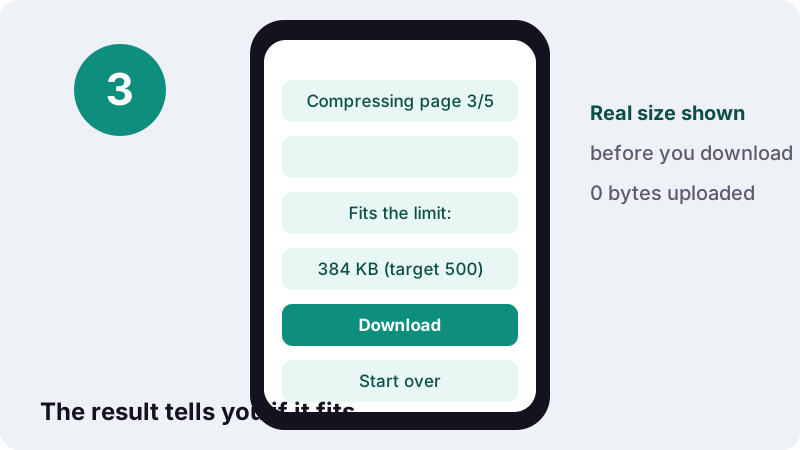
- Press Compress PDF and wait for the “Fits the limit” message.
- Download each result and upload it to the matching field.
What did our tests produce at a 500 KB target?
All three test files fitted. The scan landed at 384 KB and the colour photos at 412 KB, both well under the cap, while a typed document needed no real compression at all.
| Test file | Before | After (target 500 KB) | Fits | Time on our PC |
|---|---|---|---|---|
| 6-page text PDF, born digital | 5 KB | 4 KB | Yes | 0.1 s |
| 5-page contract scanned at 200 DPI | 2,522 KB | 384 KB | Yes | 5.0 s |
| 4 full-colour photo pages | 8,265 KB | 412 KB | Yes | 26.0 s |
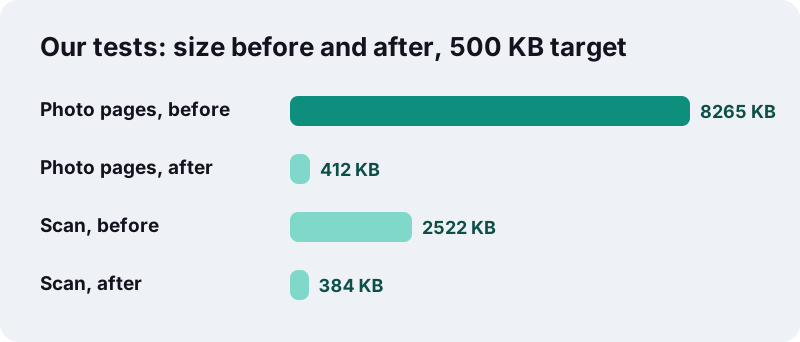
The scan shrank by about 85% and the photo file by about 95%. Those are big cuts, yet the pages still have plenty of data each, which is why the result looks close to the original.
Why does quality hold up so well at 500 KB?
Because each page keeps a large share of the budget. Divide the results by the page count and a scanned page gets about 77 KB, roughly four to five times our 15–20 KB rule of thumb for a merely readable scan.
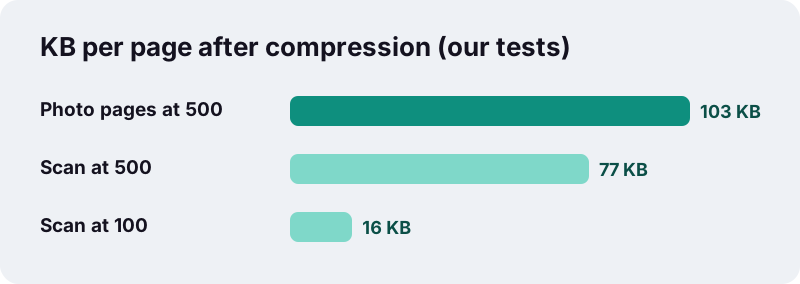
The pages are still stored as JPEG images after compression, and JPEG is lossy. But loss is a sliding scale. With this much room the engine can keep a higher resolution and a milder JPEG setting, so letters stay crisp, greys stay smooth and photos keep their texture.
| Detail on the page | At 500 KB (5 scanned pages) | At very small targets |
|---|---|---|
| Body text | Crisp | Readable, softer |
| Footnotes and fine print | Usually clear | Often the first to blur |
| Signatures and stamps | Natural edges | Blocky edges possible |
| Photos and colour logos | Close to the original | Visible JPEG blocks |
Where do 500 KB upload limits show up?
Half a megabyte is a common per-file cap on application and claim portals that expect real documents rather than single photos. Job sites, university admission forms, insurance claims and HR onboarding systems often use limits in this range. Read the exact figure next to each upload field.
- A several-page transcript or a set of mark sheets in one file.
- A rental agreement, payslips or bank statements for a background check.
- Medical bills and a discharge summary for an insurance claim.
- A portfolio sample or a research abstract with figures.
These documents are usually several pages long and often contain photos, logos or stamps. That is exactly where 500 KB shines: enough room for every page to look professional, not just legible.
How do you handle a form with several attachments?
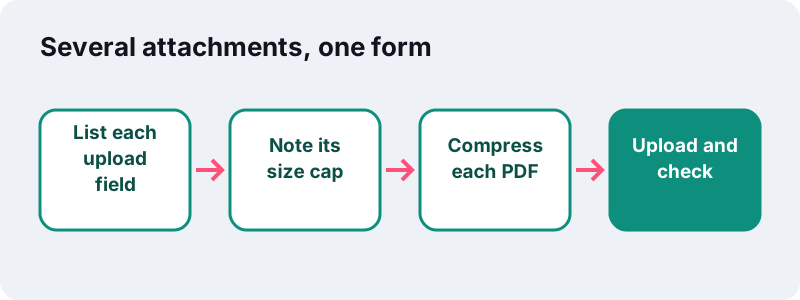
Treat each upload field as its own budget. Some forms cap every file at 500 KB; others cap the total of all files. Check which rule applies, then compress each PDF to its own target before you start uploading.
| If the form says… | What it usually means | What to set here |
|---|---|---|
| Max 500 KB per file | Each attachment checked on its own | 500 KB for every PDF |
| Total size 500 KB | All attachments added together | Split the budget, e.g. 3 files at about 160 KB |
| 500 KB, one file only | Everything must go in a single PDF | Merge first, then compress to 500 KB |
| No number shown | Unknown cap | Try 500 KB; go lower if rejected |
For a shared total, the smaller presets help: a 160 KB budget per file sits between our 100 KB and 200 KB pages, and you can type any figure into the Maximum size box.
Should you merge files before you compress PDF to 500KB?
Only if the form wants one file. If it has a separate field for each document, keep them separate. If it asks for a single PDF, join them with Merge PDF first, then run the merged file through this page.
| Approach | Good for | Watch out for |
|---|---|---|
| Compress each file separately | Forms with one field per document | Naming each file clearly |
| Merge, then compress once | Forms with a single upload field | Less room per page when many files are joined |
| Compress, then merge | Avoid; merging adds the sizes back together | The total may exceed the cap again |
Before merging, put pages in the order the reader expects with Organize PDF, and drop blank or duplicate pages. Every page you remove leaves more of the 500 KB for the ones that matter.
When should you not use the 500 KB target?
When the PDF must stay a real text document. Exact size re-draws pages as images, so text stops being selectable and searchable, and links and form fields are lost. A CV made in a word processor is the classic case.
- Check the file size first: PDFs exported from Word or a browser are often already tiny (our typed 6-page test file was 5 KB).
- If a recruiter or system may copy text from your CV, upload the original export rather than a compressed copy.
- Fill in interactive forms before compressing; the fields will not survive.
- Keep your original; the compressed file is a separate download.
If your file is already under 500 KB, you do not need to compress it at all. Compression only helps files that are over the limit.
Why does a 480 KB file sometimes get rejected?
The size is rarely the only rule. When a portal rejects a file that is clearly under its cap, the cause is usually something else in the requirements.
- The cap is a combined total and your other attachments used up the space.
- The site counts 500 KB as 500,000 bytes, so leave a margin by typing 480.
- The field accepts a different format, such as JPG only.
- The PDF is password-protected; remove the password before uploading.
- The upload timed out on a weak connection; try again on Wi-Fi.
Is it private to compress PDF to 500KB here?
Yes. The file stays on your device. Your browser reads it with the standard web file interfaces and builds the smaller copy in memory, so no server ever receives your payslips, bills or transcripts. MDN describes the interface that makes this possible:
“The FileReader interface lets web applications asynchronously read the contents of files (or raw data buffers) stored on the user's computer, using File or Blob objects to specify the file or data to read.”
Many online PDF services upload documents to their servers to process them. Here the finished screen reports the bytes read and 0 bytes uploaded, so you can see the difference for yourself.
How long does it take on a phone?
A few seconds to under half a minute on a computer in our tests, and longer on phones. Because 500 KB leaves so much room, the engine usually stops after the first few quality steps.
| Device type | What to expect | Tip |
|---|---|---|
| Desktop or laptop | 5.0 s for our 5-page scan, 26.0 s for the photo pages | Several files can be queued at once |
| Recent phone | Usually fine for a few pages | Keep the screen on and the tab in front |
| Older or low-memory phone | Slower on large colour scans | Compress one file at a time |
What other sizes and tools might you need?
If 500 KB is still too big for your portal, move down a step; if it is more than you need, the 1 MB preset keeps pages even closer to the original. For files without a fixed limit, use the main Compress PDF page.
Frequently asked questions
Will a scanned PDF look good at 500 KB?
Usually yes. In our tests a 5-page 200 DPI scan came out at 384 KB, about 77 KB per page, which is several times what a readable scan needs. Text, stamps and signatures stay clear.
How many pages can I fit in 500 KB?
It depends on the content. Typed pages take almost nothing. For scans, our test fitted five pages with room left over; four full-colour photo pages came out at 412 KB.
Can I compress several PDFs to 500 KB at once?
Yes. Choose several files together and each one is compressed to the target separately, so every attachment for a form can be prepared in one go.
My portal limits the total of all files to 500 KB. What should I do?
Divide the budget. For three files, type about 160 in the Maximum size box for each, or merge them into one PDF first and compress that file to 500 KB.
Does compressing to 500 KB keep my text selectable?
No. Exact size re-draws pages as images, so text cannot be copied or searched. If your PDF is already under 500 KB, upload the original instead.
Why did the tool return a file much smaller than 500 KB?
The engine stops at the first quality step that fits. For some files that step lands well below the limit, as with our scan at 384 KB. You still get the gentlest setting that fits.
Is it safe to compress bank or medical documents here?
The file is processed by your own browser and never uploaded, so the document stays on your device. Close the tab when finished if you share the computer.
Is ilovepdfe the same as iLovePDF?
No. ilovepdfe is independent and not affiliated with iLovePDF, a separate company. The main practical difference is that ilovepdfe does the compression in your browser rather than uploading your file.
What if my file is password-protected?
The tool will ask you to remove the password first. Open the PDF in an app that knows the password, save an unprotected copy, then compress that copy.
Sources
- FileReader — MDN Web Docs
- File API — MDN Web Docs
- JPEG — Wikipedia
- Image compression — Wikipedia
- PDF (Portable Document Format) Family — Library of Congress
- PDF — Wikipedia
- Kilobyte — Wikipedia