How to convert JPG to PDF under 50KB
- Choose images. Select the photo or scan of your document.
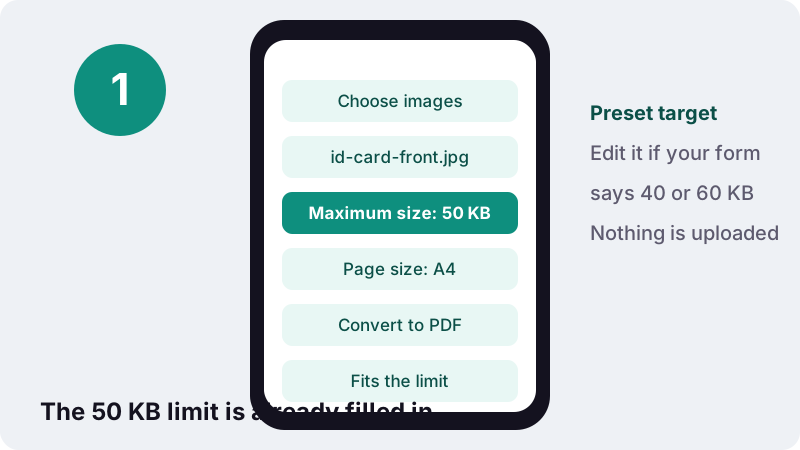
- Confirm the limit. Leave Maximum size at 50 KB or type the cap printed on your form.
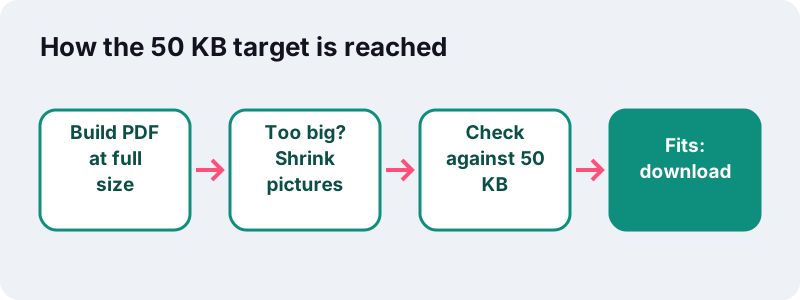
- Convert to PDF. Press Convert to PDF; the tool shrinks the picture until the file fits.
- Download. Save the PDF once the message says it fits the limit, then upload it.
How do you make a JPG to PDF under 50KB?
Choose the photo, leave the maximum size at 50 KB, and press Convert to PDF. The tool builds the PDF, measures it, and redraws the picture smaller until the file is at or below the limit. Making a JPG to PDF under 50KB this way usually takes a second or two.
Settings for a JPG to PDF under 50KB
- Choose images: the scan or phone photo the portal asks for. One page is the easiest case.
- Check the Maximum size box. It reads 50 KB; type another number if your form states a different cap.
- Leave page size on A4 unless the instructions say otherwise. Margin and orientation do not change the file size in any meaningful way.
- Press Convert to PDF. When the message says “Fits the limit”, download the file and upload it.
How small is 50 KB, really?
Very small. Our 50 KB means 51,200 bytes, and a single 12-megapixel phone photo in our tests weighed 3,687 KB, about 74 times more. Getting under the cap means throwing away most of the pixels the camera captured, so the goal is to keep the ones that matter.
| Pages in the PDF | Budget per page | What that budget can hold |
|---|---|---|
| 1 | about 50 KB | A card or certificate photo that stays readable at normal zoom |
| 2 | about 25 KB each | Front and back of an ID card; large print only |
| 3 | about 17 KB each | Short multi-page proof; small print becomes hard to read |
| 4 or more | 12 KB or less each | Usually too tight: split the upload or ask for a bigger allowance |
The table is plain arithmetic, but it explains most failed uploads: people try to fit a five-page document into a box designed for one card.
Which uploads typically ask for a 50 KB PDF?
Tight caps like this show up where a portal collects many small identity documents from thousands of applicants. We are not naming specific portals because limits change; always read the number printed next to the upload button.
- Identity proof: an ID card, driving licence or passport data page photographed on a table.
- Certificates: a mark sheet, birth certificate or caste/category certificate in some application systems.
- Proof of address: a utility bill page or rental receipt.
- Signature or thumb impression pages, when the form wants them as PDF rather than as an image.
- Small supporting documents in scholarship, exam and recruitment forms.
If the portal accepts a JPG directly and only the PDF route is giving you trouble, check which format it really wants. Converting to PDF adds nothing when an image is allowed.
What did our 50 KB tests produce?
Every job fitted. We ran the same engine you use, in headless Chrome on an ordinary Windows PC, with full-resolution 12-megapixel phone photos. Even three photos came out well below the cap.
| Input | Original size | PDF result | Under 50 KB? | Time |
|---|---|---|---|---|
| 1 phone photo | 3,687 KB | 42 KB | Yes | 1.2 s |
| 2 phone photos | 7,375 KB | 36 KB | Yes | 2.4 s |
| 3 phone photos | 11,062 KB | 36 KB | Yes | 3.8 s |
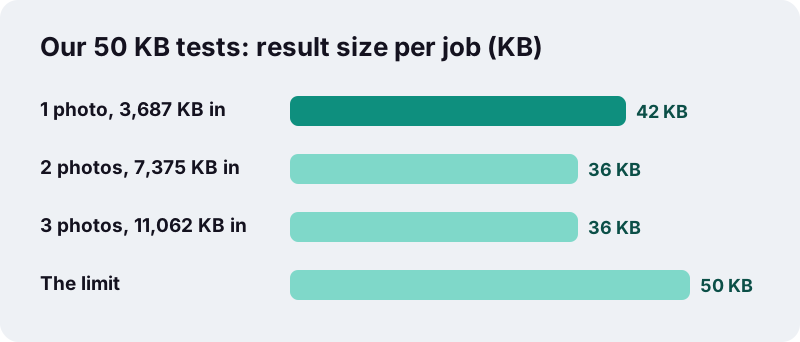
Notice that two and three photos landed at the same 36 KB. With more pages, the engine has to step further down before the total fits, so each page carries fewer pixels. Fitting the cap is not the same as staying sharp.
How does the tool shrink a photo to 50 KB?
It tries up to ten settings in a row, from gentle to aggressive, and stops at the first one that fits. Each step redraws every picture with a shorter longest side and a lower JPEG quality, then rebuilds and weighs the PDF again.
| Step | Longest side | JPEG quality |
|---|---|---|
| 1 | Original picture | Original |
| 2–4 | 2,400 → 1,600 px | 0.80 → 0.62 |
| 5–7 | 1,300 → 900 px | 0.52 → 0.38 |
| 8–10 | 750 → 480 px | 0.32 → 0.22 |
JPEG is built for exactly this trade. The Library of Congress format description puts it this way:
“Lossy compression is variable and governed by a number of parameters; typical settings provide from 10:1 to 20:1 reductions in file size.”
A 50 KB target asks for more than that typical range, which is why the picture also has to lose pixel dimensions, not just compression quality.
Will a 50 KB PDF still be readable?
For one card or one page with large print, usually yes. For small print, dense tables or several pages, expect blur. Legibility depends far more on the photo you start with than on the converter.
| Document | Expect at 50 KB | Tip |
|---|---|---|
| ID card, one side | Name, number and photo readable | Crop to the card edges before converting |
| ID card, front and back | Readable if both are tightly cropped | Two images, one per page |
| Certificate, A4 | Headings and names readable, fine print soft | Shoot straight on, in daylight |
| Bank statement | Small digits often unreadable | Ask whether 100 KB or 200 KB is allowed |
| Multi-page contract | Not realistic | Split into separate uploads |
If the clerk cannot read it, the upload can be rejected even though it met the size rule. When a portal allows more, use JPG to PDF under 100 KB instead.
How should you photograph the document first?
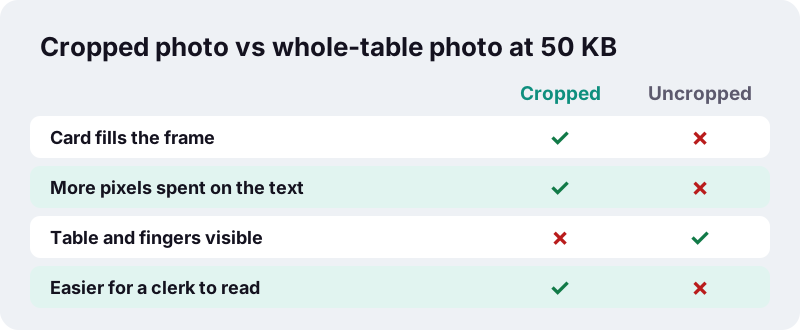
Fill the frame with the document and nothing else. Every pixel of tabletop is a pixel the 50 KB budget cannot spend on your name and number.
- Lay the card on a plain, dark surface so its edges stand out.
- Use daylight or a bright room; switch the flash off to avoid a glare spot on laminated cards.
- Hold the phone flat above the document, not at an angle.
- Crop in your gallery app until only the document remains, then save.
- Use the camera photo, not a screenshot or a forwarded chat copy, which is already compressed.
What if the PDF still comes out above 50 KB?
The tool tells you instead of pretending. After the last step it shows: “We got as close as we could but could not reach 50 KB without making the pages unreadable”, and still offers the smallest version it made.
- Remove a page: upload the front and back as two separate files if the form allows it.
- Crop harder, so the document itself fills the picture.
- Raise the target only if the portal's own rule permits it.
- Already have a PDF? Compress PDF to 50 KB works on existing PDF files.
In our tests even three full-size phone photos fitted under 50 KB, so a miss usually means many pages or an unusually detailed image.
Can you do it on a phone at the application centre?
Yes. The whole job runs in the phone's browser, so you can photograph a document, convert it and upload it from the same device, even in a queue. Our timings came from a PC; a phone will take a little longer, especially with several pages.
- iPhone: pick the photo from the library in Safari; the PDF is saved to Files, in Downloads.
- Android: pick from Gallery or Files in Chrome; the PDF appears in Downloads.
- Computer: drop the picture onto the page or use the file dialog.
Keep the original photo afterwards. If the portal later asks for a clearer copy, you can convert it again with a higher limit instead of rescanning.
Why convert ID documents on your own device?
Because identity papers are the files you least want copied to a stranger's server. Here the picture is read by your browser, resized on a canvas in memory, and saved straight back to your device; the done message ends with “0 bytes uploaded”.
Browsers only let a page touch files you hand over through the file picker or by dropping them, as MDN’s File API documentation describes. Nothing else on your phone is visible to the tool.
Other size limits and related tools
Different portals, different caps. For a two-page upload with more breathing room, see under 100 KB; for several photos in one file, under 200 KB. With no limit at all, the main JPG to PDF converter keeps your pictures untouched.
Frequently asked questions
Can I really get a phone photo under 50 KB as a PDF?
Yes. In our tests a 3,687 KB 12-megapixel phone photo became a 42 KB PDF in about 1.2 seconds. Detail is reduced, so crop to the document first.
Is 50 KB measured as 50,000 or 51,200 bytes?
The tool counts 1 KB as 1,024 bytes, so 50 KB is 51,200 bytes. If a portal counts 1 KB as 1,000 bytes, type 48 in the box for a safety margin.
Can I change the 50 KB target?
Yes. The box is preset to 50 but editable. Type the exact number your form shows, for example 30 or 60.
Does the page size affect the file size?
Hardly. A4, Letter or Same as image only change the page frame; the bytes are almost all in the picture. Choose what the form asks for.
Why is my 50 KB PDF blurry?
To fit, the picture was redrawn with far fewer pixels. Crop away the background, use better light, or upload fewer pages per file to give each page more of the budget.
Can I put the front and back of my ID in one 50 KB file?
Usually yes. Add both images, keep the order front then back. In our tests two full phone photos fitted in 36 KB.
Is my ID uploaded to your server?
No. The picture is processed in your browser and the result is saved on your device. The page reports 0 bytes uploaded.
Is ilovepdfe the same as iLovePDF?
No. ilovepdfe is an independent site and is not affiliated with iLovePDF, which is a separate company. The practical difference is that ilovepdfe processes your files in your browser instead of uploading them.
Does it accept iPhone HEIC photos?
Not yet. Export the photo as JPEG, or set Camera > Formats to Most Compatible, then convert the JPG.
Sources
- JPEG Image Encoding Family — Library of Congress
- File API — MDN Web Docs
- FileReader – Web APIs — MDN Web Docs
- HTMLCanvasElement: toBlob() method — MDN Web Docs
- Image file type and format guide — MDN Web Docs
- Using HEIF or HEVC media on Apple devices — Apple Support