How to make a JPG to PDF under 200KB from several photos
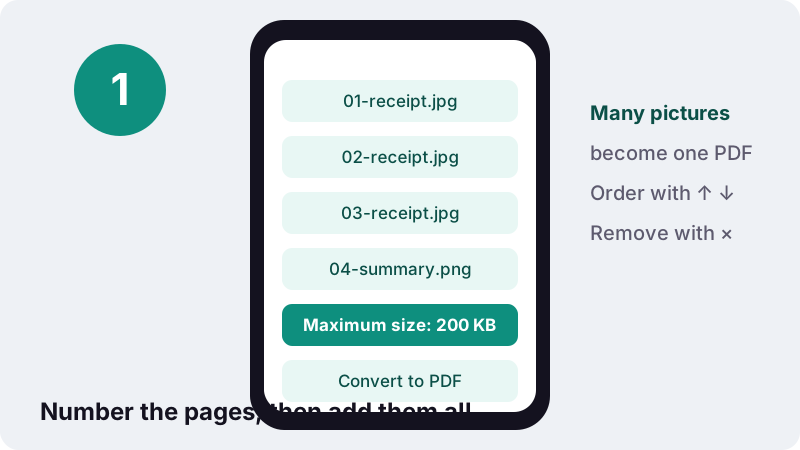
- Choose images. Select all the photos of your document at once.
- Set the page order. Use the arrows to put the pages in reading order and × to remove extras.
- Keep the 200 KB limit. Leave Maximum size at 200 KB or type the figure your form gives.
- Convert and download. Press Convert to PDF, then download the single PDF once it fits.
How do you combine photos into a JPG to PDF under 200KB?
To make a JPG to PDF under 200KB, select every photo of the document at once, put them in reading order, keep Maximum size at 200 KB and press Convert to PDF. Each picture becomes a page.
Detail is trimmed evenly across all pages until the file fits, so no single page is sacrificed for the others. A three-photo job took under three seconds in our tests, and you can watch the progress line count through the images as it works.
- Choose images, selecting all the pages in one go. Use Add more files to append pictures from another folder.
- Check the list order. Move any page with ↑ or ↓, and drop duplicates with ×.
- Leave orientation on Automatic so landscape receipts and portrait pages each get the right page shape.
- Convert to PDF, then download
images.pdfand rename it if the portal asks for a specific name.
Which documents arrive as several photos?
Anything that was never a digital file. When the only copy is paper, people photograph it page by page, and the portal then wants one PDF instead of a dozen pictures.
- Expense and insurance claims: a set of receipts, a repair quote, a pharmacy bill.
- Coursework: handwritten answers or lab notes photographed for an online submission.
- Paper application forms filled in by hand, then signed and photographed.
- Rental or move-in records: a few pictures plus a signed checklist page.
- Medical or school records that were handed over as printouts.
What these have in common is length. A single card fits comfortably under far smaller caps; the 200 KB allowance exists because a claim or an assignment runs to several pages, and each page still has to be legible to the person checking it. Treat the limit as a budget for the whole set, not for one picture.
If the portal accepts several separate files, check whether it really wants one PDF. Separate uploads give each page more of the size allowance.
How many pages can share 200 KB?
Plan on two to five pages for comfortable reading, more only for large handwriting or simple receipts. Our 200 KB is 204,800 bytes, and every page takes its share of that total.
| Photos in the PDF | Average per page | Realistic for |
|---|---|---|
| 2 | about 100 KB | Detailed pages: forms with small print, stamped certificates |
| 3 | about 67 KB | Typed letters, filled-in forms |
| 5 | about 40 KB | Receipts, handwriting in pen |
| 8 | about 25 KB | Large print only; consider splitting |
| 12+ | under 17 KB | Usually too tight for reliable reading |
Busy pages cost more than plain ones. A crumpled receipt on a patterned tablecloth uses far more bytes than the same receipt on a white sheet of paper, because JPEG spends data on every texture it sees.
What did our 200 KB tests show?
All three jobs fitted. We converted full 12-megapixel phone photos with the engine on this page, running in headless Chrome on an ordinary Windows PC.
| Job | Photos in | PDF out | Fits 200 KB | Time |
|---|---|---|---|---|
| 1 photo | 3,687 KB | 110 KB | Yes | 0.7 s |
| 2 photos | 7,375 KB | 83 KB | Yes | 1.6 s |
| 3 photos | 11,062 KB | 124 KB | Yes | 2.8 s |
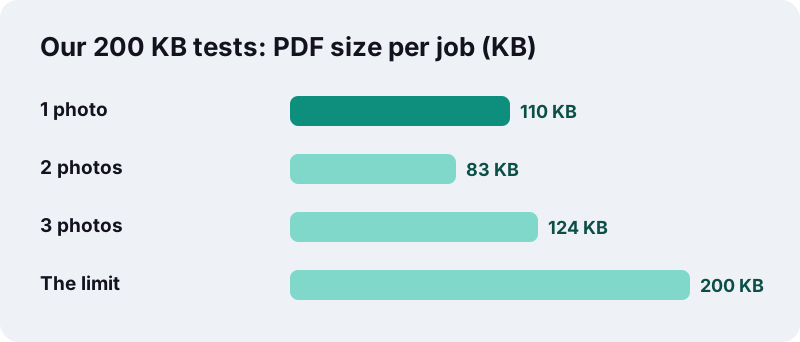
The single photo kept the most detail: 110 KB is more than twice what the same picture received under a 50 KB cap. With three photos at 124 KB, each page still had about 41 KB, roughly what a lone page gets on a tight single-document upload.
How do you keep the pages in the right order?
Order is decided before conversion, by the list on screen. The PDF follows it exactly, page one at the top. Getting it right once saves a reviewer from hunting through a shuffled claim.
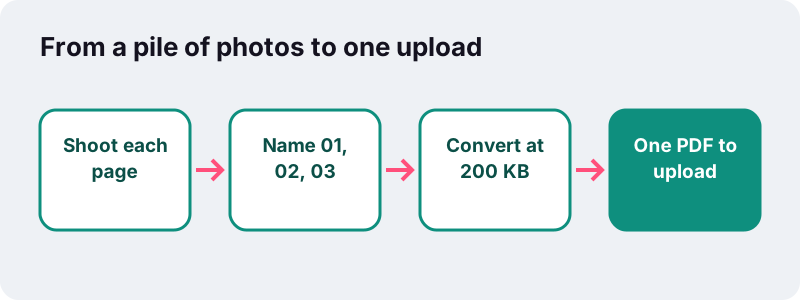
- Rename photos with a leading number (01, 02, 03) before adding them; many file pickers sort by name.
- Photograph pages in reading order, so the camera's timestamps match the sequence.
- After adding, scan the list from top to bottom and fix strays with the arrows.
- Spot a mistake after downloading? Organize PDF moves pages without redoing the conversion.
How should you photograph a stack of pages?
Shoot every page the same way: same distance, same light, one page per photo. Consistent pictures compress evenly, so no single page ends up much blurrier than the rest.
Shooting pages for a JPG to PDF under 200KB
- Photograph one page per picture. A two-page spread in one shot halves the detail each page receives.
- Lay receipts on plain white paper; patterned surfaces waste bytes.
- Flatten folded receipts and booklet pages under a book for a minute first.
- Stand so your own shadow and the phone's shadow fall off the page.
- Keep the same zoom for every page, so text appears at a similar size throughout the PDF.
Five consistent photos usually beat four sharp ones plus one dark, tilted shot. The weak page is the one a reviewer will question.
Which page settings suit a mixed set of photos?
A4 or Letter with Automatic orientation gives the tidiest result: every page has the same paper size, and wide pictures lie on their side. Same as image produces pages of different shapes, which looks messy when printed.
| Setting | Recommended here | Reason |
|---|---|---|
| Page size | A4, 210 × 297 mm (or US Letter, 8.5 × 11 in, in North America) | All pages print at the same paper size |
| Orientation | Automatic | A wide receipt gets a landscape page, a form stays portrait |
| Margin | Small | Leaves a printer-safe white border |
| Maximum size | 200 KB (editable) | Type your own figure if the portal differs |
None of these settings changes the byte count noticeably; the pictures themselves carry nearly all the weight. Choose them for how the document should look, not for size.
Why send one PDF instead of loose photos?
Because a PDF is a document, not a folder. It keeps the pages in a fixed order and opens the same way on the reviewer's computer, phone or printer. The Library of Congress format description sums up what the format is for:
“PDF represents formatted, page-oriented documents. These documents may be structured or simple. They may contain text, images, graphics, and other multimedia content, such as video and audio.”
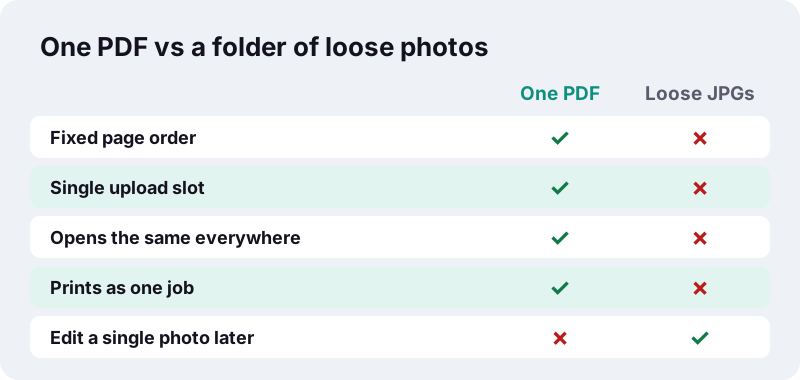
A single file also helps on the receiving side. When a claims handler or teacher downloads many submissions at once, one named PDF per person is far easier to file than a scattering of IMG_ pictures with camera-generated names.
Loose JPGs still win in one case: when someone needs to edit or replace a single picture later. Keep your originals for that, and send the PDF.
What if the photos will not fit in 200 KB?
Then the document is too long for one upload at that limit, and the tool says so instead of producing an unreadable file. It still hands you its smallest attempt, so you can judge whether it is usable.
- Split the set into two PDFs (pages 1–4 and 5–8) and upload them separately, or cut an existing PDF with Split PDF.
- Drop pages the form does not need with Remove pages.
- Starting from a PDF rather than photos? Compress PDF to 200 KB shrinks existing files.
- Only two pages and a stricter rule? Under 100 KB is built for front-and-back uploads.
Where do the photos go while the PDF is made?
Nowhere. The pictures are read by your browser, resized on a canvas in your device's memory, and written into a new PDF that you download. The finishing line on screen reports “0 bytes uploaded”, and receipts or medical papers never touch a server.
Web pages can only reach files that you pick or drop onto them, a rule set out in MDN’s File API overview. Larger batches simply take longer on slower phones, because all the work happens locally.
Related size targets and tools
For a single card under a strict cap, see JPG to PDF under 50 KB. With no limit at all, the main JPG to PDF tool keeps every photo at full quality.
Frequently asked questions
How many photos can I put in a 200 KB PDF?
There is no fixed cap. Two to five pages usually stay readable; past eight, each page gets so few bytes that small text blurs. In our tests three phone photos came to 124 KB.
Can I mix receipts in landscape and pages in portrait?
Yes. With orientation on Automatic, each picture gets a page in its own direction while all pages keep the same paper size.
Why did one photo come out at 110 KB, not 199 KB?
The converter stops at the first setting that fits, and the steps between settings are fairly large. Any result at or below the limit is accepted.
Can I add more photos after choosing the first batch?
Yes. Tap Add more files to append pictures, then move them into place with the arrows before converting.
What is the PDF called?
With several pictures the file is named images.pdf. Rename it after downloading if the portal wants a particular name.
Can I change the 200 KB limit?
Yes. The Maximum size field is preset to 200 and editable. Type 150, 250 or whatever your form states.
Are my receipts or records uploaded?
No. Everything is processed in your browser and saved straight to your device.
Is ilovepdfe the same as iLovePDF?
No. ilovepdfe is an independent site and is not affiliated with iLovePDF, which is a separate company. The practical difference is that ilovepdfe processes your files in your browser instead of uploading them.
Does a 200 KB PDF print well?
Usually, for two to five pages from sharp photos. Long sets printed from a 200 KB file show softer detail than the originals.
Sources
- PDF (Portable Document Format) Family — Library of Congress
- JPEG Image Encoding Family — Library of Congress
- File API — MDN Web Docs
- HTMLCanvasElement: toBlob() method — MDN Web Docs
- International standard paper sizes (ISO 216) — Wikipedia
- Letter (paper size) — Wikipedia