How to compress a PDF with ilovepdfe
- Choose PDF files. Tap Choose PDF files and pick one or more PDFs from your phone or computer. They are opened locally, not uploaded.
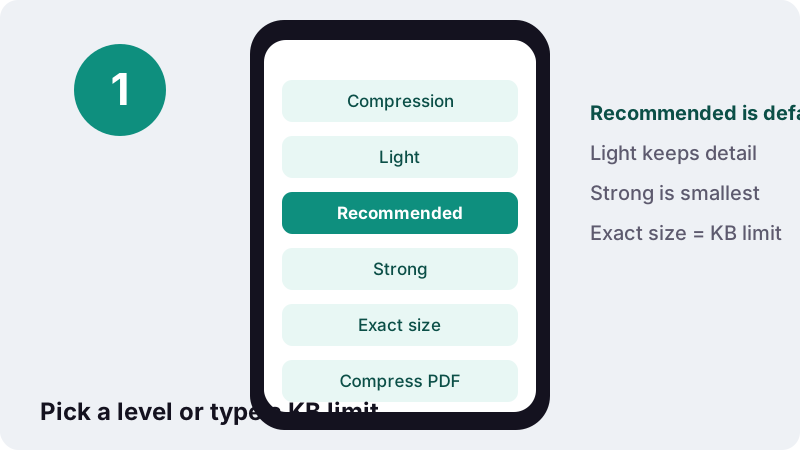
- Pick a compression level. Select Light, Recommended or Strong, or choose Exact size and type the maximum in KB that your form allows.
- Press Compress PDF. Press Compress PDF and wait while each page is processed. The page shows progress and, at the end, the size before and after.
- Download the result. Download the file ending in -compressed.pdf. Open it once and zoom in to check that every page is still readable before you send it.
What does this compress PDF tool actually do?
It makes a PDF smaller by trying several versions of the file on your device and handing you the smallest one that still makes sense. You choose how far it may go: a gentle level, a balanced one, a strong one, or a hard limit in kilobytes.
Everything runs in JavaScript inside the page. Your document is opened from your own storage, rebuilt in memory, and saved back as a new download called yourfile-compressed.pdf. When the job ends, the page reports how long it took and confirms that zero bytes were uploaded.
There is no account, no daily quota and no watermark stamped on the result. You can drop in several PDFs at once and each one gets its own compressed copy.
What happens, step by step, when you compress a PDF here?
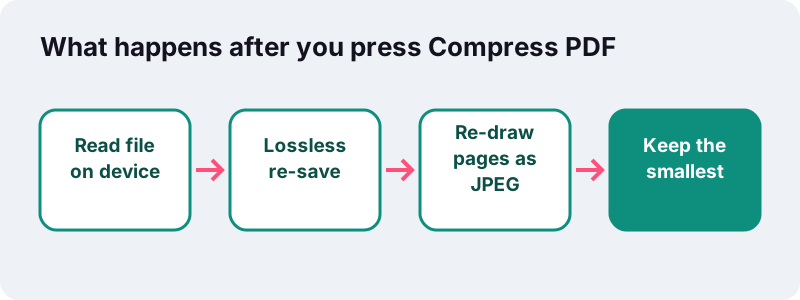
The engine always starts with the safe option and only moves to the lossy one if you allow it. That order matters, because the safe option keeps your text exactly as it was.
- Lossless re-save. The PDF is rewritten with object streams, a packing method that groups many small internal objects so they can be compressed together. Nothing visible changes.
- Optional re-draw. With Light, Recommended or Strong, every page is also rendered to a canvas and stored as a JPEG picture at a set resolution and quality.
- Pick the winner. The original, the lossless copy and the re-drawn copy are compared. The smallest one is what you download.
- Honest fallback. If neither new version beats the original, you get your original back with a message saying it is already as small as it gets.
“Beginning with PDF version 1.5, indirect objects (except other streams) may also be located in special streams known as object streams (marked /Type /ObjStm ). This technique enables non-stream objects to have standard stream filters applied to them, reduces the size of files that have large numbers of small indirect objects and is especially useful for Tagged PDF .”
Which compression level should you choose?
Use Recommended for email and most uploads, Light when the file may be printed, and Strong only when size beats looks. If a form gives you a number, skip the levels and use Exact size.
The figures below come straight from the tool's settings. Resolution is expressed as pixels per inch of the page, and quality is the JPEG setting used when a page is re-drawn.
| Level | Re-draw resolution | JPEG quality | Best for |
|---|---|---|---|
| Light | about 115 px per inch | 82% | Files you may print; diagrams with fine lines |
| Recommended (default) | 90 px per inch | 66% | Email attachments, sharing, most portals |
| Strong | about 65 px per inch | 45% | Hard size limits where readability is enough |
| Exact size | starts near 108, can step down to about 25 | 80% down to 16% | Any form that states a KB or MB maximum |
Remember that a level only sets the ceiling. If the lossless copy is already smaller than the re-drawn one, the lossless copy wins and your text stays selectable.
How does Exact size mode reach a KB limit?
You type the maximum from your form, for example 200, and the engine walks down a ladder of ten resolution and quality steps until the file fits. It stops at the first step that is small enough, so you get the sharpest version that respects the limit.
- If the lossless copy already fits, nothing is re-drawn at all. Text, links and form fields survive.
- Each step lowers both resolution and JPEG quality a little, from about 108 px per inch at 80% down to about 25 px per inch at 16%.
- If even the last step is too big, you still get the smallest version produced, plus a plain message saying the limit could not be reached without making pages unreadable.
Sizes here use 1 KB = 1,024 bytes. If a portal is strict about its own counting, type a slightly lower number (for example 95 instead of 100) to leave a margin.
Why do re-drawn pages lose selectable text?
Because a re-drawn page is a photograph of the page, not the page itself. The letters become pixels inside a JPEG picture, so you can no longer highlight, copy or search them, and clickable links or fillable fields disappear.
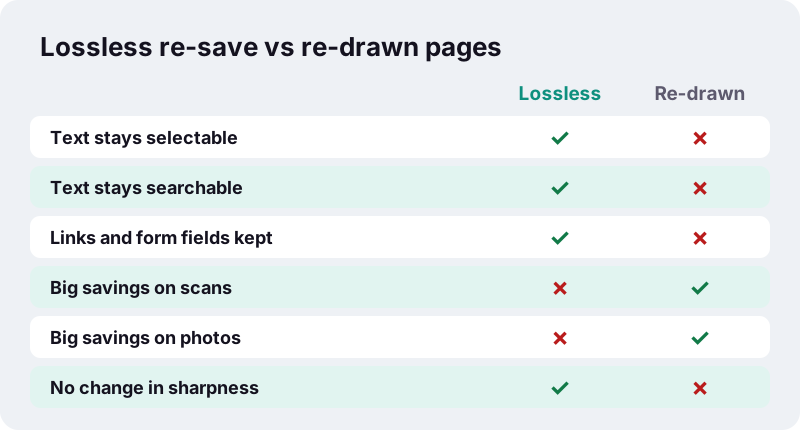
JPEG is a lossy format: it throws away detail the eye is less sensitive to. That is why it shrinks scans and photos so well, and why heavy settings show blur or blocky edges.
“JPEG typically achieves 10:1 compression with a loss in image quality that, while perceptible, is widely agreed upon to be acceptable.”
If you need searchable text after compressing, keep the original as your master copy and send the compressed one only where a size limit forces it.
How much smaller will my PDF get?
It depends almost entirely on what is inside. Scans and photos shrink dramatically; PDFs made from a word processor are usually tiny already and barely move.
These are our own measurements from 17 October 2026, run with the same engine in Chrome on an ordinary Windows PC, using Exact size mode:
| Test file | Original | Target | Result | Fits? | Time |
|---|---|---|---|---|---|
| 6-page text PDF (born digital) | 5 KB | any | 4 KB | Yes | 0.1–0.4 s |
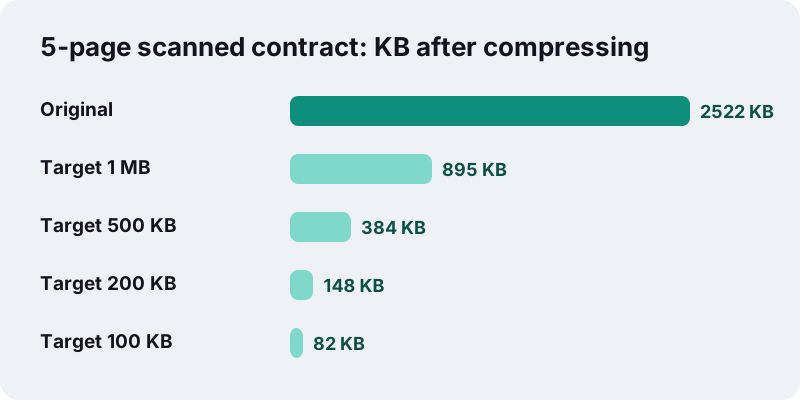
| 5-page scanned contract, 200 DPI | 2,522 KB | 1,024 KB | 895 KB | Yes | 1.9 s |
| 5-page scanned contract, 200 DPI | 2,522 KB | 500 KB | 384 KB | Yes | 5.0 s |
| 5-page scanned contract, 200 DPI | 2,522 KB | 200 KB | 148 KB | Yes | 13.1 s |
| 5-page scanned contract, 200 DPI | 2,522 KB | 100 KB | 82 KB | Yes | 15.2 s |
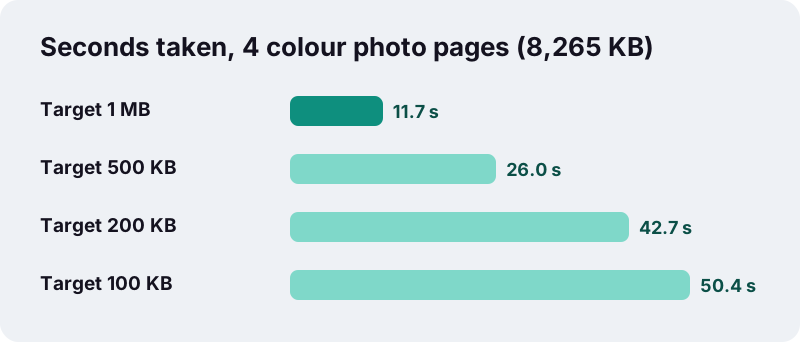
| 4 full-colour photo pages | 8,265 KB | 1,024 KB | 827 KB | Yes | 11.7 s |
| 4 full-colour photo pages | 8,265 KB | 200 KB | 150 KB | Yes | 42.7 s |
| 4 full-colour photo pages | 8,265 KB | 50 KB | 39 KB | Yes, heavy loss | 73.4 s |
The last row is the honest one: four dense colour photo pages did get under 50 KB (39 KB), but only at the lowest step, where photos lose most detail and the run took over a minute. Fitting is not the same as looking good.
Which PDFs shrink a lot, and which barely change?
Image-heavy PDFs shrink the most. Text-only PDFs, exported from Word, Google Docs or a browser's print dialog, are already compact because their text is stored as characters and fonts, not as pictures.
| What is in the PDF | Typical outcome | What to pick |
|---|---|---|
| Phone photos of paper | Large savings | Recommended or Exact size |
| Flatbed or office scanner output | Large savings | Recommended; Light if it will be printed |
| Brochure with big colour images | Good savings, some softening | Light first, then Recommended |
| Report typed in a word processor | Little or no change | Usually leave it; the original may come back |
| Fillable form or signed contract | Re-draw removes fields | Avoid re-draw; send as is if allowed |
A tiny result is not a failure. When the tool returns your original, it means the file was already efficient and any further cut would cost visible quality.
Compress PDF to a specific size: which page should you use?
Each size below opens the same engine with Exact size already set, and each page explains what fits in that budget. You can still edit the number after opening it.
| Page | Preset | Typical situation |
|---|---|---|
| Compress PDF to 50 KB | 50 KB | Very strict form fields; one or two pages at most |
| Compress PDF to 100 KB | 100 KB | Job and exam application forms with tight caps |
| Compress PDF to 200 KB | 200 KB | Several supporting documents sharing one total limit |
| Compress PDF to 500 KB | 500 KB | Longer scans that still need to look clean |
| Compress PDF to 1 MB | 1,024 KB | Portals with a 1 MB ceiling; email-friendly files |
Starting from photos rather than a PDF? JPG to PDF under 100 KB scales pictures down while building the PDF, which often gives a cleaner result than compressing afterwards.
Is it private to compress PDF files in the browser?
Yes, in the plain technical sense: the browser reads the file from your storage and the work happens in the tab. Many online PDF services upload your file to their servers first; this one has no server step at all.
“The FileReader interface lets web applications asynchronously read the contents of files (or raw data buffers) stored on the user's computer, using File or Blob objects to specify the file or data to read.”
That matters for payslips, ID scans, medical letters and contracts. You can check it yourself: open your browser's developer tools, watch the Network tab while compressing, and you will see no file being sent. See our privacy page for the details.
How long does compression take on a phone or computer?
Light files take a second or two; heavy photo PDFs with a tight target can take close to a minute, because every page is rendered again at each step of the ladder.
- In our tests, a 2.5 MB five-page scan reached 1 MB in about 2 seconds.
- In our tests, an 8 MB four-page photo PDF needed about 50 seconds to reach 100 KB.
- Phones usually take longer than a desktop, and very large scans depend on how much memory the device has free.
- Keep the tab open and in front while it works; switching apps may pause it on some phones.
What should you try before compressing harder?
Removing what the reader does not need is often better than crushing every page. A smaller page count lets each remaining page keep more detail.
- Delete blank backs, duplicate pages or instruction sheets with Remove pages.
- Send a long document in parts using Split PDF, if the form accepts several files.
- Fix sideways scans with Rotate PDF first; rotation is lossless and adds nothing to the size.
- Rescan in grayscale at 150–200 DPI if colour is not required; your scanner app usually offers this setting.
- Combine several small files with Merge PDF after compressing each one, since merging copies pages unchanged.
When should you not compress PDF files at all?
Skip the lossy levels when the document's value lies in its text layer or its interactive parts. A lossless re-save is still fine in these cases.
- Fillable forms you still need to fill in.
- Digitally signed documents, where any rewrite can break the signature check.
- Archival copies; the Library of Congress lists searchable text and lossless compression among the features of high-quality PDFs.
- Technical drawings with hairline detail that must survive printing.
Apple's built-in Preview app on Mac also offers a Reduce File Size filter and warns that the result may be of lower quality, so the trade-off is the same everywhere: smaller files cost detail.
Other PDF tools that work the same way
Every tool on ilovepdfe runs on your device with the same no-upload approach. These are the ones people most often use alongside compression:
Frequently asked questions
Is it free to compress PDF files here?
Yes. There is no account, no paywall on file size, no daily limit and no watermark. The only practical limit is your device's memory with very large scans.
Will compressing make my PDF text unselectable?
Only if a page is re-drawn. Light, Recommended, Strong and Exact size can turn pages into JPEG images, which removes selectable text, search, links and form fields. If the lossless copy is the smallest, your text stays as it was.
Why did I get my original file back?
Because neither the lossless re-save nor the re-drawn version was smaller than what you uploaded. Your PDF was already efficient, typically a text document exported from a word processor.
What does Exact size do if my limit is impossible?
It tries ten steps of lower resolution and quality, keeps the smallest result, and tells you plainly that the limit was not reached. Removing pages or splitting the file usually solves it.
Can I compress several PDFs at once?
Yes. Choose several files in one go; each is processed in turn and gets its own compressed download.
Does it work on iPhone and Android?
Yes, in any modern mobile browser. Heavy files simply take longer on a phone than on a computer, so keep the tab open until the download appears.
Is my PDF uploaded anywhere?
No. The file is read by your browser and processed in the tab. The result screen reports 0 bytes uploaded, and you can confirm it in the browser's network panel.
Can it compress password-protected PDFs?
No. Encrypted PDFs show an error asking you to remove the password first, using the app that set it.
Which level gives the best quality for printing?
Light. It re-draws pages at about 115 pixels per inch with high JPEG quality, and the smallest-file rule still returns the lossless copy when that is smaller.
Is ilovepdfe the same as iLovePDF?
No. ilovepdfe is an independent site and is not affiliated with iLovePDF, which is a separate company. The practical difference is that ilovepdfe processes your files in your browser instead of uploading them.
Guides
Sources
- FileReader — MDN Web Docs
- File API — MDN Web Docs
- PDF (Portable Document Format) Family — Library of Congress
- PDF — Wikipedia
- JPEG — Wikipedia
- Lossy compression — Wikipedia
- Reduce the size of a PDF in Preview on Mac — Apple Support
- Dots per inch — Wikipedia