How to compress a PDF to 1 MB
- Choose PDF files. Tap Choose PDF files or drop your document on the box.
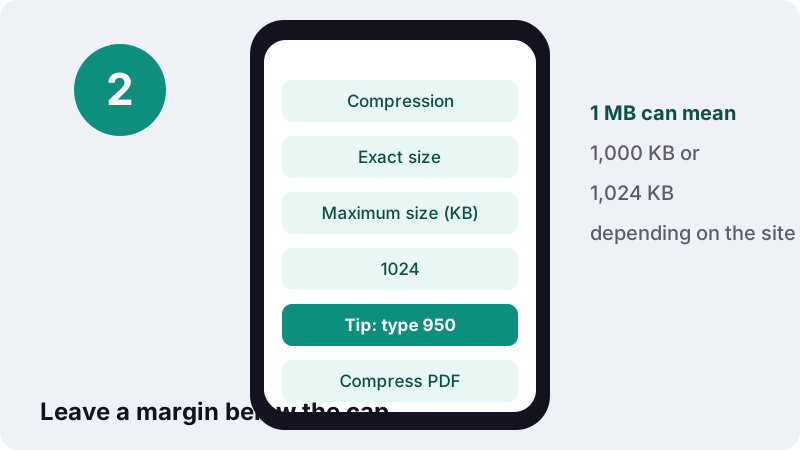
- Set the maximum size. Exact size is pre-set to 1,024 KB. Type 950 if the portal may count 1 MB as one million bytes, or your share of a total limit.
- Press Compress PDF. The tool reduces quality step by step until the file fits and shows the final size next to the target.
- Download and check. Download the PDF, check it at 100% zoom, then upload it to the portal.
How do you compress PDF to 1MB?
To compress PDF to 1mb, choose the file above, keep the Exact size target at 1,024 KB and press Compress PDF. The engine lowers quality only until the file fits, and at this size that usually means a light touch: our scans and photo pages kept most of their detail.
- Tap Choose PDF files or drop your document on the box.
- Leave Exact size at 1024, or type a slightly lower figure such as 950 for a safety margin.
- Press Compress PDF; the result line shows the final size next to the target.
- Download the file and check it before you upload it.
What did our tests show at a 1 MB target?
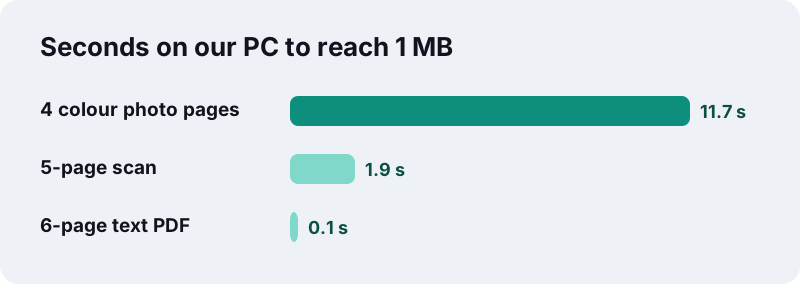
Every test file fitted, and the heavy ones did so quickly. A 2.5 MB scanned contract came out at 895 KB in under two seconds; an 8 MB colour file dropped to 827 KB in about twelve.
| Test file | Original | Result (target 1,024 KB) | Fits | Time on our PC |
|---|---|---|---|---|
| 6-page text PDF, born digital | 5 KB | 4 KB | Yes | 0.1 s |
| 5-page contract scanned at 200 DPI | 2,522 KB | 895 KB | Yes | 1.9 s |
| 4 full-colour photo pages | 8,265 KB | 827 KB | Yes | 11.7 s |
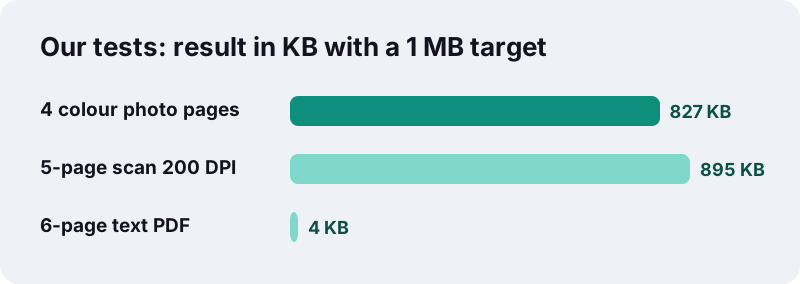
That scan works out at about 179 KB per page, around ten times what a merely readable scan needs. In practice the compressed pages are hard to tell apart from the originals on a phone or laptop screen.
Which official uploads use a 1 MB limit?
One megabyte is a frequent cap on government, visa and passport portals, as well as on university and job applications. One example we checked: the Embassy of India in Bogotá publishes an upload guide for passport applicants that sets a 1 MB limit for documents.
“The total of all uploaded documents should be not more than 1 MB”
| Rule in that guide | What it means for your PDFs |
|---|---|
| Maximum size allowed 1 MB | No single file can be bigger than 1 MB |
| Total of all documents not more than 1 MB | Every file together must fit in 1 MB |
| Documents in PDF format | Convert photos of papers to PDF first |
| Maximum 5 documents, including photograph and signature | The photo and signature also use part of the budget |
| Maximum 12 upload attempts | Check sizes before uploading, not after |
Note the word total. Under a rule like this, a single 1 MB PDF would use the whole allowance, leaving nothing for the other documents.
How do you share one 1 MB budget between several files?
Decide how much each file may use before compressing anything. Add up the sizes of what you already have, such as the photo, then divide what is left between the remaining PDFs and type each share into the Maximum size box.
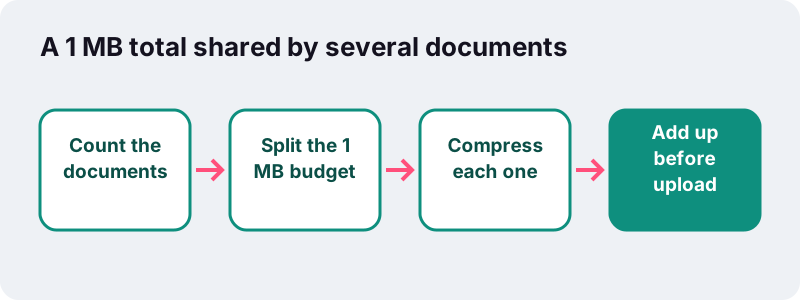
| Example plan for a 1 MB total | Pages | Target to type | Preset that fits |
|---|---|---|---|
| Address proof | 1 | 200 KB | 200 KB page |
| Old passport, first and last page | 2 | 300 KB | type 300 |
| Birth certificate | 1 | 200 KB | 200 KB page |
| Room left for photo and signature | – | about 300 KB | check their own limits |
If the portal instead allows 1 MB for each file, this page’s default is all you need. For tighter fields, the 500 KB preset is the next step down.
Is 1 MB the same as 1,024 KB?
Not always. Some systems count a megabyte as 1,000 KB of 1,000 bytes each, others as 1,024 KB of 1,024 bytes. The two can differ by about 47 KB, which is enough to turn a file that looked fine into a rejected upload.
“In some areas of information technology, particularly in reference to random-access memory capacity, kilobyte instead often refers to 1024 (2^10) bytes.”
| How the site counts | 1 MB in bytes | Safe number to type here |
|---|---|---|
| Decimal (SI) | 1,000,000 | 950 |
| Binary | 1,048,576 | 1000 |
| Not stated | Unknown | 950 |
Typing 950 costs you almost nothing in quality at this size and removes the guesswork.
Will my document still look sharp at 1 MB?
Almost always, for ordinary documents. With roughly 180 KB per scanned page in our test, the engine only needed its gentlest steps, so small print, seals and signatures kept their edges.
- Body text, tables and handwriting: no visible change on screen in our tests.
- Colour photos: slight softening if you zoom in a long way.
- Printing on A4 or Letter: suitable for ordinary office printing.
- The one real change: pages become images, so text is no longer selectable or searchable.
If the PDF is already under the limit, upload it as it is. Typed documents exported from Word or a browser are often tiny; our 6-page test file was 5 KB.
Should you compress PDF to 1MB before emailing it?
Not because of the mail service’s cap, which is far larger, but because small files are kinder to the recipient. Gmail allows 25 MB of attachments for personal accounts, and Outlook defaults to 20 MB for internet accounts and 10 MB for Exchange mailboxes.
| Mail service (from its help page) | Default attachment limit | 1 MB files that fit |
|---|---|---|
| Gmail, personal account | 25 MB | about 25 |
| Outlook 2013 and later, internet account | 20 MB | about 20 |
| Outlook with an Exchange mailbox | 10 MB by default | about 10 |
A 1 MB file opens quickly on mobile data, does not clog a shared mailbox and is unlikely to be blocked by a strict company server. It is a sensible default size for contracts, quotes and reports you send often.
What should you check before uploading to a government portal?
Size is only one of the rules. Run through this list once your file fits, because many portals limit the number of attempts and a rejection can mean starting a form again.
- The file is a PDF, not a photo, if the portal asks for PDF.
- Pages face the right way; fix sideways scans with Rotate PDF.
- Pages are in the order requested; reorder them with Organize PDF.
- There are no blank or extra pages using up the budget.
- The PDF has no password.
- Your name, numbers and dates are legible at 100% zoom.
- Combined sizes are under any total limit.
How fast is it on a phone?
Quick on a computer and usually manageable on a phone. Because 1 MB needs only mild compression, the engine stops early; the larger the original, the longer it takes.
Phone times depend on memory and processor, and we have not timed every model. For a large colour scan on an older phone, keep the screen on and the browser tab in front until the download button appears.
Why process passport documents in your browser?
Because identity papers are exactly the files you do not want copied to unknown servers. Here the browser opens the PDF through the standard File API, builds the smaller copy in your device’s memory and offers it as a download. Nothing is uploaded.
Many online PDF services upload files to their own servers for processing. With local processing, the only place your passport scan travels to is the official portal you choose to send it to.
Which related tools help with a 1 MB upload?
If you only have photos of your papers, turn them into a PDF with JPG to PDF first. For limits with no fixed number, the main Compress PDF page offers Light, Recommended and Strong levels.
Frequently asked questions
Does compressing a scan to 1 MB reduce its quality?
A little, but rarely visibly. In our tests a 5-page 200 DPI scan went from 2,522 KB to 895 KB, about 179 KB per page, and stayed sharp on screen. Text becomes part of the page image, so it is no longer selectable.
What number should I type if the portal says 1 MB?
Type 950. Some sites count 1 MB as 1,000,000 bytes, which is about 977 KB in this tool’s units, so 950 leaves a safe margin.
My portal allows 1 MB in total for all documents. What do I do?
Give each document its own share. For example, three one-page documents could each be compressed to about 250 KB, leaving room for a photo and signature if they count too.
Can I use this for an Indian passport application?
The Embassy of India in Bogotá’s guide sets a 1 MB maximum and says all documents together must not exceed 1 MB, in PDF format. Check the current rules of the office you apply through, then compress each file to its share.
How long does it take to compress PDF to 1MB?
On our Windows PC, 1.9 seconds for a 5-page scan and 11.7 seconds for four colour photo pages. Phones take longer, depending on the model.
Can I compress several PDFs to 1 MB at once?
Yes. Choose several files together and each is reduced to the target separately. If you need one file, merge them first and compress the merged PDF.
Is my passport scan uploaded to your server?
No. The whole job runs in your browser. The finished screen shows the bytes read and 0 bytes uploaded.
Is ilovepdfe the same as iLovePDF?
No. ilovepdfe is an independent website, not affiliated with iLovePDF, which is a separate company. In practice, ilovepdfe compresses your file locally in the browser instead of uploading it.
My PDF is already 800 KB. Should I still compress it?
Not for a 1 MB per-file limit; upload it unchanged. Only compress if the portal has a total limit shared with other files, or if you want a smaller file for email.
Sources
- Guidelines for uploading of ICAO photograph, signature and documents (SOP for document uploading in Applicant Portal) — Embassy of India, Bogotá
- Kilobyte — Wikipedia
- Send attachments with your Gmail message — Gmail Help
- Attachment size exceeds the allowable limit error — Microsoft
- File API — MDN Web Docs
- PDF (Portable Document Format) Family — Library of Congress
- JPEG — Wikipedia